Video Resume Mistakes That Get You Rejected and How to Fix Each One
A good video resume can lift an application. A bad one does more damage than sending nothing at all.
That is the uncomfortable thing about video. A weak written resume is forgettable. A weak video is memorable for the wrong reasons, because the employer has now seen and heard you make a poor first impression.
The good news is that almost every bad video resume fails for the same small set of reasons, and every one of them is fixable with a retake. This guide covers the 15 most common mistakes, grouped by where they happen: in the script, on camera, in the recording itself and in how the video is sent.
Mistakes in what you say
1. Reading your resume aloud
The most common mistake of all. The candidate walks through their work history in order: "I started at Company A in 2019, then moved to Company B in 2021, where I was responsible for..."
The employer already has your resume. A video that repeats it gives them nothing new and takes longer than reading it.
The fix: Choose one or two results from your resume and tell the story behind them. What was the problem, what did you do, what changed? The page lists what happened. The video explains it.
2. Wasting the first 15 seconds
"Um, hi, so, my name is... okay, so I'm just going to tell you a little bit about myself."
Most viewers decide within the first 15 to 20 seconds whether to keep watching. If those seconds are filler, many will not.
The fix: Open with your name, the role you want and one strong line. "Hi, I'm Amara Okafor, and I'm applying for the customer service role at BrightLine. Last year I had the highest satisfaction score on my team." Then keep going.
3. Listing adjectives instead of evidence
"I am hardworking, passionate, a team player, a fast learner and a great communicator."
Every candidate says this, so it tells the employer nothing. Worse, on video it sounds rehearsed and hollow.
The fix: Replace every adjective with one example. Do not say you are a problem solver. Describe a problem you solved, with a number if you have one.
4. Making it about what you want
"I'm looking for a role where I can grow and develop my skills in a company that values its people."
That may be true, but the employer is watching to find out what you can do for them.
The fix: Spend most of the video on what you bring. One sentence on why you want this particular role is enough, and it should connect to the employer: "I noticed you are expanding your support hours, and that is exactly the kind of team I want to help build."
5. One generic video for every job
A video that never mentions a role or a type of work sounds like a mass mailing. Viewers can tell.
The fix: At minimum, record one version per type of role you apply for. For the jobs you care about most, name the role and the company in the opening and closing lines. Because the middle section usually stays the same, a tailored version takes only a few minutes to re-record.
6. No clear ending
The video just stops, or trails off with "so... yeah, that's me."
The fix: Close in two sentences: a thank you and a next step. "Thank you for watching. My resume is attached, and I would welcome the chance to talk."
Mistakes in how you come across
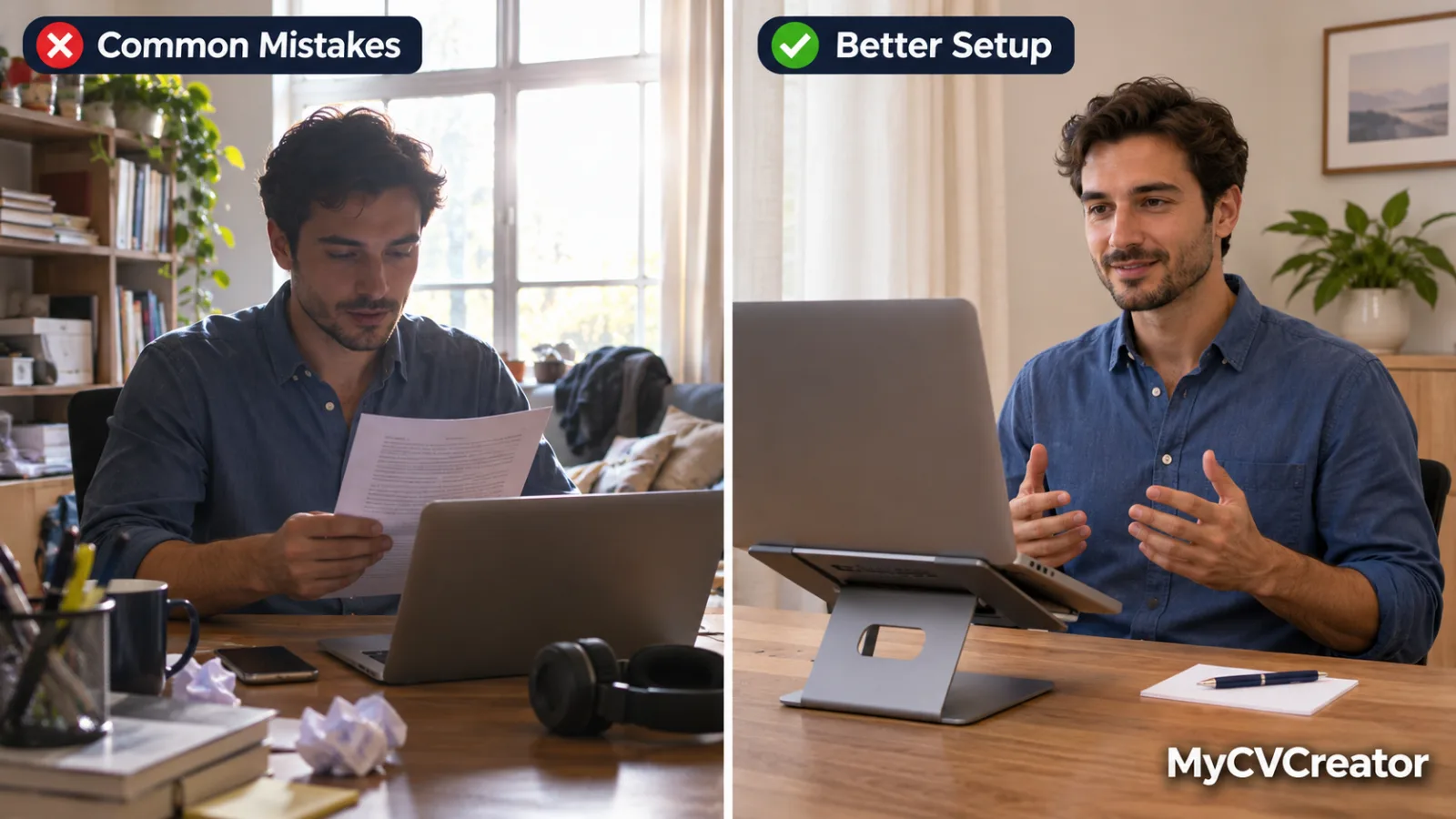
7. Reading from the screen
Your eyes move side to side, your voice goes flat and the viewer can see you are reading. It breaks the feeling that you are speaking to them.
The fix: Do not try to read a full script or recite one from memory. Learn your four sections, hook, proof, fit and close, and the key point in each. If you need a prompt, put three or four bullet words right beside the camera lens. Several takes will make it sound natural.
8. Looking at yourself instead of the camera
It is instinctive to watch your own face on the screen. To the viewer, it looks as though you are staring slightly past them.
The fix: Look at the lens. On a phone, that is the small dot at the top, not the middle of the screen. A small sticker or arrow next to the lens helps. It feels unnatural and looks right.
9. Low energy
Video flattens people. A delivery that feels normal in the room often looks tired or bored on screen.
The fix: Sit or stand up straight, smile as you start and speak with slightly more energy than feels natural. Record a test and watch it with the sound off. If you look bored, the viewer will feel it.
10. Speaking too fast
Nerves speed people up, and a rushed delivery is hard to follow, especially for viewers listening in a second language.
The fix: Slow down by about ten percent and pause for a beat between sections. If the video runs long at that pace, cut words. Do not talk faster.
Mistakes in the recording
11. Bad sound
This is the technical mistake that matters most. Viewers will tolerate average picture quality. They will not sit through echo, traffic, a television in the next room or a voice they have to strain to hear.
The fix: Record in the quietest room available with the windows and doors closed. Turn off fans and air conditioning for two minutes if you can. Rooms with curtains, carpets and soft furniture echo less. Sit close to the device, and use wired earphones with a microphone if the built-in one sounds distant. Always play back a test before recording properly.
12. Bad lighting
The classic error is sitting with a bright window behind you, which turns you into a dark shape. Overhead lights alone can also cast heavy shadows under the eyes.
The fix: Face the light. Sit facing a window during the day, or put a lamp behind your device, pointing towards you. Your face should be the brightest thing in the frame.
13. A distracting background or awkward framing
An unmade bed, laundry, people walking past, or a camera angle looking up from a desk at your chin and the ceiling.
The fix: Use a plain wall or a tidy corner. Raise the device to eye level on a stack of books. Frame yourself from mid-chest to just above your head. If you are recording on a phone, hold it steady by propping it up rather than holding it in your hand, and record horizontally unless a platform asks otherwise.
14. Going too long
A four-minute video will rarely be watched to the end, and length itself signals that you cannot get to the point.
The fix: Keep it between 60 and 120 seconds, with 90 as the target. That is roughly 150 to 250 words. If your draft is longer, cut the weakest example, not the pauses.
Mistakes in how you send it
15. Using it wrongly
Several separate errors fall under this heading, and each can undo a good video.
- Sending it instead of a written resume. Screening software cannot read video. Always send the written resume as well.
- Attaching a large video file to an email. It may bounce or be blocked. Send a link.
- Sending it when the posting says no extra material. That reads as not following instructions.
- Including personal details. Age, marital status, religion, home address and family details do not belong in a video any more than on a resume.
- Not testing the link. Open it in a private browser window before sending, to make sure it plays for someone who is not logged in.
The fix: Offer the video as an optional link alongside your written application: "I have also recorded a 90-second introduction, if useful." Our comparison of video resumes and traditional resumes explains when to send one and when to hold back.
Before and after: one opening, fixed
Here is how several of these mistakes look together, and what fixing them does.
Before:
Um, hi. So my name is Daniel and I'm going to tell you a bit about myself. I'm a very hardworking and passionate person and I'm a great team player. I started my career in 2018 at a retail company where I was responsible for sales, and then in 2020 I moved to another company where I was also in sales, and I'm now looking for a new opportunity where I can grow.
After:
Hi, I'm Daniel Adeyemi, and I'm applying for the sales executive role at Northfield.
In my current job I manage 45 retail accounts, and last year I grew that portfolio's revenue by 22 percent, mostly by winning back customers who had stopped ordering.
I did that by calling every lapsed account myself and asking what went wrong. That habit of listening first is what I would bring to your team.
The second version is shorter, starts with a name and a role, contains a number and a method, and tells the employer what they would be getting. Nothing about the candidate changed. Only the script did.
A 10-point check before you send
Watch your final take once and tick these off.
- Does it start with my name and the role within five seconds?
- Is there at least one specific result, ideally with a number?
- Does it say why I fit this role, not only what I want?
- Is it under two minutes?
- Can every word be heard clearly?
- Is my face well lit, with no bright window behind me?
- Is the background tidy and the camera at eye level?
- Am I looking at the lens, not reading?
- Does it end with a thank you and a next step?
- Does the link open for someone who is not logged in?
If any answer is no, record another take. That is the advantage a video resume has over an interview: you can redo it until it is right.
The easiest way to avoid most of these
Most of the mistakes above come from two sources: starting without a script, and settling for the first take.
The MyCVCreator video resume builder is designed around both. It drafts a script from your saved or uploaded resume, so you begin with your real experience rather than a blank page. You then edit it until it sounds like you. Recording happens in your browser with a countdown, and you can play each take back and retake as often as you need before saving the one you want to download or share.
For the full process, including the four-part structure and complete example scripts, see our guide on how to make a video resume.
Frequently asked questions
What is the biggest mistake in a video resume? Reading your written resume aloud. The employer already has it. Use the video to tell the story behind one or two results and to show how you communicate.
How long is too long for a video resume? Anything over two minutes. Aim for about 90 seconds.
Does video quality matter? Sound matters most. Clear audio, good light on your face and a tidy background are enough. You do not need professional equipment or editing.
Should I add music or effects to my video resume? Generally no. Unless you work in a creative or media field where editing is part of the job, music and effects distract from what you are saying.
Is it bad to read from a script? Reading word for word usually looks and sounds unnatural. Know your key points and speak to the camera, using a few bullet words near the lens if needed.
How many takes should I do? As many as you need. Three to five is typical. Stop when you have one that is clear and natural, not when it is perfect.
Can a bad video resume hurt my application? Yes. A poorly made video leaves a worse impression than none. If you cannot get a take you are happy with, send the written resume alone.
The short version
Bad video resumes fail in predictable ways: they repeat the written resume, start slowly, run long, sound poor or get sent the wrong way. Fix the script first, then the sound and light, then keep it under two minutes and offer it as a link. Every one of these mistakes disappears with a clear structure and a few more takes.
Record your video resume on MyCVCreator and retake it until it passes the 10-point check.
Related reading
- How to Make a Video Resume: Step-by-Step With Script Examples
- Video Resume vs Traditional Resume: When Each One Works
- How to Pass a One-Way Video Interview
- Common Interview Questions and How to Answer Them
- US Resume Etiquette: What to Remove
- US Resume vs International CV: What to Delete
- AI Cheating in Interviews: What Gets You Flagged