Free Google Docs Resume Templates: The Complete Guide
Free Google Docs resume templates are popular for a simple reason: they help you create a clean, professional resume quickly without paying for premium design tools or hiring a designer. Instead of spending hours trying to align margins, adjust spacing, and make everything “look right,” you start with a ready-made layout that already follows a professional structure. That means you can focus on what actually gets interviews: strong content, clear achievements, and the right keywords for the job.
Google Docs also makes the entire resume workflow easier in 2026. You can edit your resume from any device (laptop, tablet, or phone), and changes save automatically so you never lose progress. You can keep multiple versions for different roles for example, one resume for customer service, another for admin roles, and a third for remote jobs without rewriting everything from scratch. It’s also easy to collaborate: you can share a view-only or comment-enabled link with a mentor, recruiter, or friend to get feedback without sending files back and forth. And when you’re done, you can export a polished PDF in a few clicks, which is still the preferred format for most employers because it keeps your formatting consistent.
This updated 2026 guide shows you exactly how to do it the right way. You’ll learn how to choose the best google docs cv template (and when you actually need a CV vs a resume), how to build an ATS-friendly resume format google docs that recruiters can scan in seconds, and how to take a downloadable Word template and turn it into a flexible google documents resume template inside Google Docs. You’ll also see the formatting rules that prevent common mistakes like templates that look great but break when uploaded into an ATS so your resume stays readable, professional, and ready to submit anywhere.
Why use a Google Docs resume template?
A well-designed google doc resume template eliminates the most frustrating part of resume writing: formatting. Instead of fighting margins and spacing, you start with a proven structure and focus on content.
Here’s what you gain:
-
Speed: Start with a layout that already works.
-
Consistency: Headings, spacing, and alignment are standardized.
-
Easy sharing: Send a view-only link for feedback from a mentor or recruiter.
-
Simple exporting: Download a PDF that keeps the formatting intact.
-
Version control: Duplicate the file for different roles and industries without rewriting from scratch.
If you’re searching for google docs resume templates because you need something quick, clean, and application-ready, Google Docs is one of the easiest workflows in 2026.
What makes a “good” resume template for Google Docs?
Not all resume templates google docs are created equal. Some look stylish but cause problems with applicant tracking systems (ATS) or print/export awkwardly. A strong resume template for google docs usually checks these boxes:
ATS-friendly structure (non-negotiable for most jobs)
-
One-column layout (best for ATS parsing)
-
Standard section headings: Summary, Skills, Experience, Education
-
No text boxes, heavy graphics, icons, or complex tables
-
Minimal use of columns (if any), and only for low-risk areas like a short skills list
Readable typography
-
Body font: 10.5–12 pt
-
Name: 14–18 pt (clear, not oversized)
-
Consistent font family (one font for everything)
-
Clean bullets with consistent indentation and spacing
Logical ordering (the recruiter-friendly flow)
Most job seekers do best with reverse-chronological order:
-
Header (Name + Contact)
-
Summary (or Objective for entry-level)
-
Skills
-
Experience
-
Education
-
Certifications / Projects / Volunteer work (optional)
That structure is the most widely accepted resume format google docs pattern across industries because it’s easy to scan and easy for ATS tools to parse.
Resume vs CV in Google Docs: choosing the right template
People often search both google doc cv template and google doc resume template, but they aren’t always the same thing. Choosing the wrong one can make you look unfocused (or under-detailed) depending on your field.
Resume (most job applications)
-
1–2 pages
-
Achievement-focused (impact, results, numbers)
-
Tailored to the job description
Best for: corporate roles, business, tech, operations, marketing, sales, customer service, most roles in the private sector.
CV (academic, research, some countries)
A curriculum vitae google doc template (or curriculum vitae template google docs) is usually:
-
2–5+ pages
-
Includes research, publications, teaching, conferences, grants, awards
Best for: academic roles, research positions, some government roles, and regions where “CV” is the standard term for a resume.
Rule of thumb:
If the job post says resume, use a resume template. If it says CV, use a CV structure with academic sections.
Free Google Docs resume templates
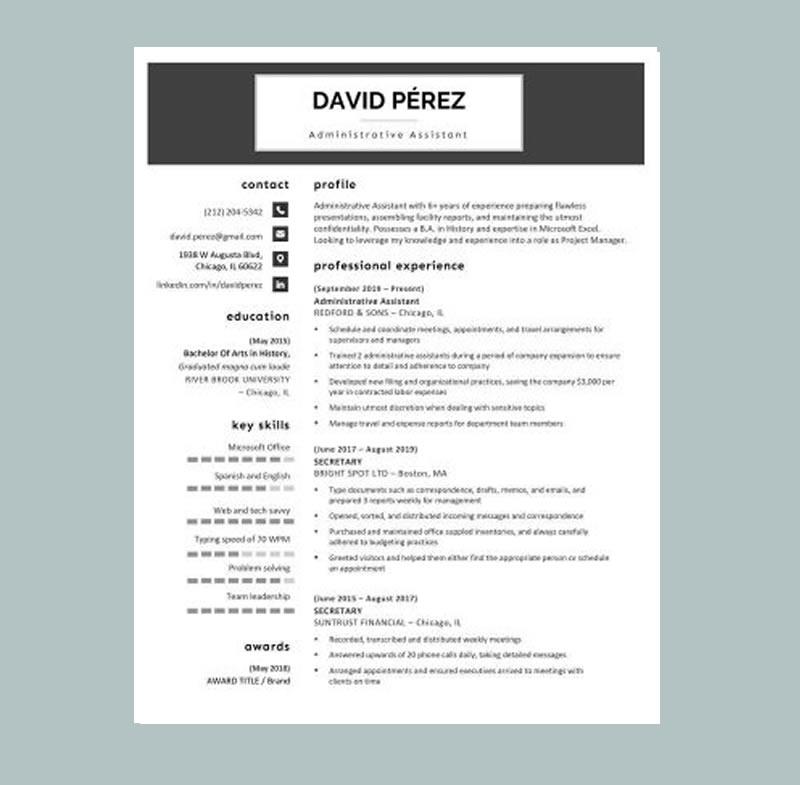
Cosmopolitan Resume Black
Download Resume Template
Simple yet stylish, the Cosmopolitan Resume Green template helps you stand out while keeping your application polished and professional. It’s made for job seekers who want a modern design with a fresh, confident look without going over the top.
This version features the same clean structure and smart spacing as the original Cosmopolitan, enhanced with green accents that add energy and clarity. The layout directs attention to the most important details your name, professional title, and key achievements while staying easy to scan for recruiters and ATS-friendly for online applications. The bold header puts your identity front and center, creating a strong first impression in seconds.
Because it balances personality with professionalism, Cosmopolitan Resume Green works across many industries and experience levels. It’s a strong choice for creative roles (design, content, media), customer-facing jobs (retail, sales, hospitality), and modern business roles (marketing, admin, support) anywhere you want to appear organized, capable, and memorable.
Cosmopolitan Resume Green

Download Resume Template
Simple yet stylish, the Cosmopolitan Resume Green template helps you get noticed with a fresh, modern look while still keeping everything clean, professional, and easy to read. Its balanced layout and clear typography make your resume easy to scan in seconds, and the green accents add just the right amount of personality drawing attention to your name, title, and top strengths without overpowering your content.
Designed with a bold header and well-structured sections, this template makes it simple to present your work history, education, and skills in a way that feels organized and credible. It also follows an ATS-friendly structure, so your details stay readable for online application systems while still looking great to human recruiters.
Because it blends professionalism with a modern touch, Cosmopolitan Resume Green works across many industries from creative roles like design, content, and media, to customer-facing jobs in retail, sales, and hospitality, as well as office and business support roles such as administration, operations, and marketing. You can customize it quickly, adjust colors and fonts if needed, and export a polished resume that looks confident, consistent, and ready for interviews.
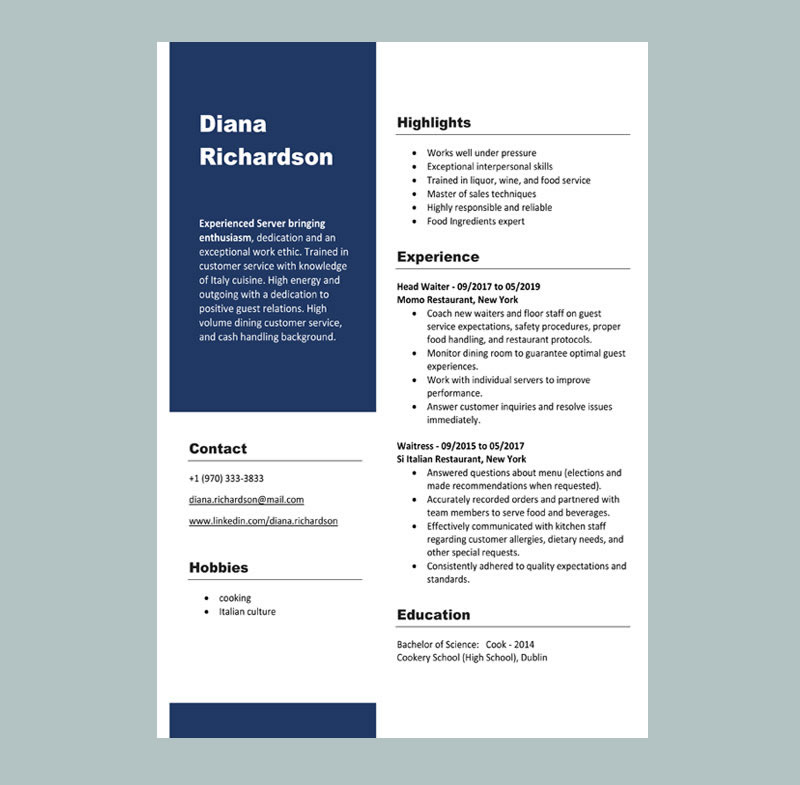
Waitress Resume Template
Download Resume Template
Waitress Resume Template helps you create a clean, professional resume that highlights the most important hospitality skills customer service, speed, accuracy, teamwork, and a positive attitude. Using a well-structured template ensures you include all the details hiring managers want to see and present them in a clear, easy-to-scan format. Since it’s fully customizable, you can tailor it for restaurants, cafés, hotels, and event venues to improve your chances of getting hired quickly. Waitress Resume Template helps you create a clean, professional resume that highlights the most important hospitality skills customer service, speed, accuracy, teamwork, and a positive attitude. Using a well-structured template ensures you include all the details hiring managers want to see and present them in a clear, easy-to-scan format. Since it’s fully customizable, you can tailor it for restaurants, cafés, hotels, and event venues to improve your chances of getting hired quickly.
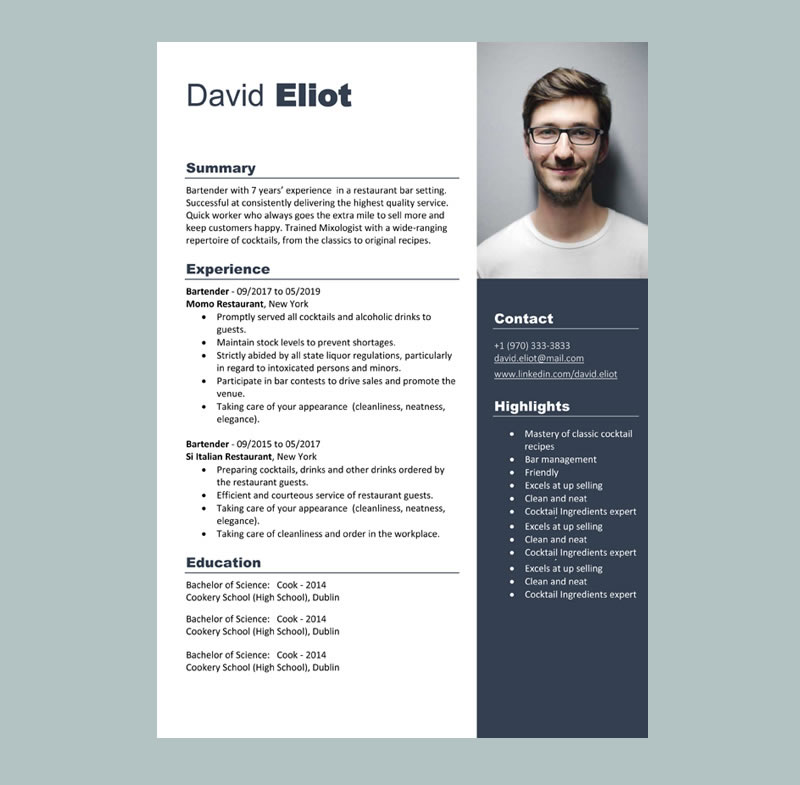
Bartender Resume Template
Download Resume Template
Bartender Resume Template helps you create a polished, job-ready resume that highlights the skills employers want in hospitality speed, accuracy, customer service, and attention to detail. A professional template ensures you include the right information and present it clearly, so hiring managers can quickly see your experience behind the bar and the value you bring to their team. Because it’s fully customizable, you can tailor it for bars, lounges, restaurants, hotels, and event venues to improve your chances of landing interviews.
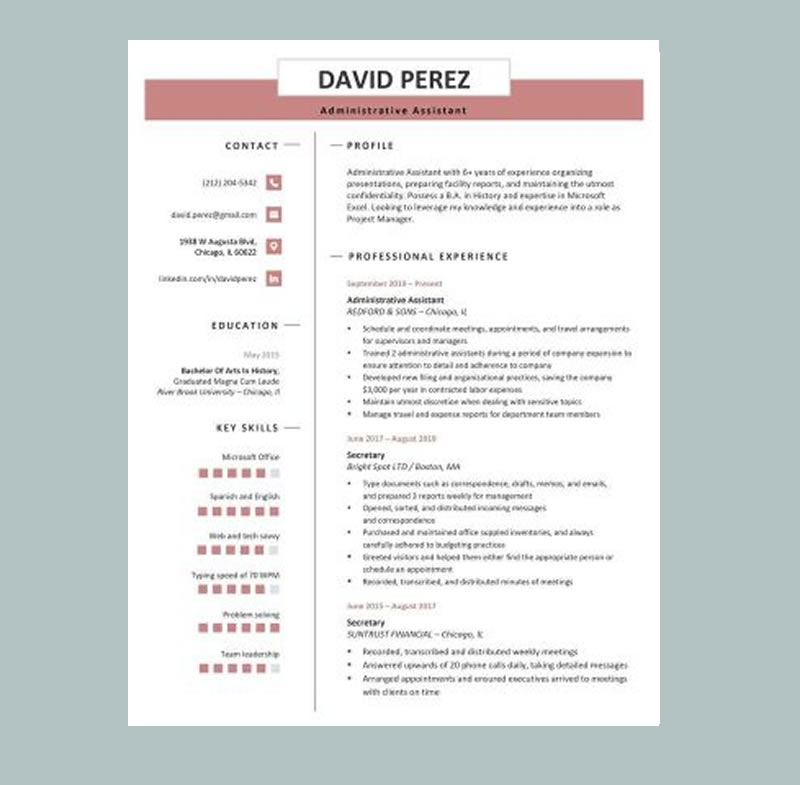
Premium Professional Resume Word Wine
Download Resume Word
Premium Professional Resume Word Wine delivers a refined, confident look with a clean layout and bold header that instantly elevates your application.
Sleek and modern, this template features a wine-colored contact header and presents your name in a polished first impression. Clearly labeled sections keep your resume organized and easy to scan, and the built-in skill bar lets you showcase your strengths at a glance so employers can quickly see where you excel.
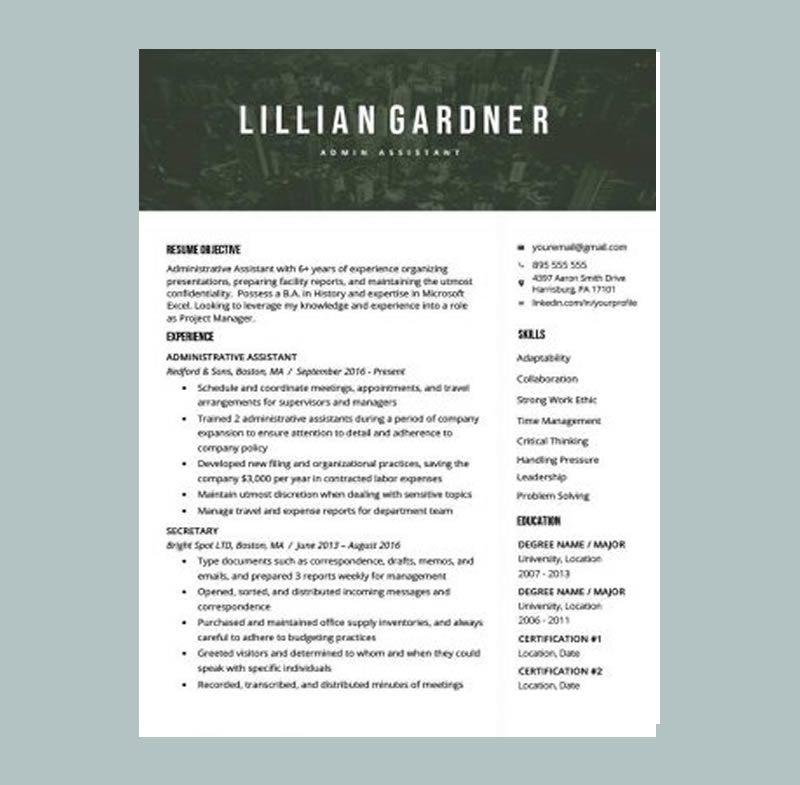
Majestic Resume Word Template Green
Download Resume Template
Majestic Resume Word Template Green is one of our boldest designs, featuring a city skyline header with modern green accents that place your name and title front and center.
The striking header is balanced with clean, traditional formatting that keeps your experience, skills, and education easy to scan. A crisp sans-serif font improves readability, making it more likely recruiters will take in every key detail.
Majestic Resume Word Template Blue
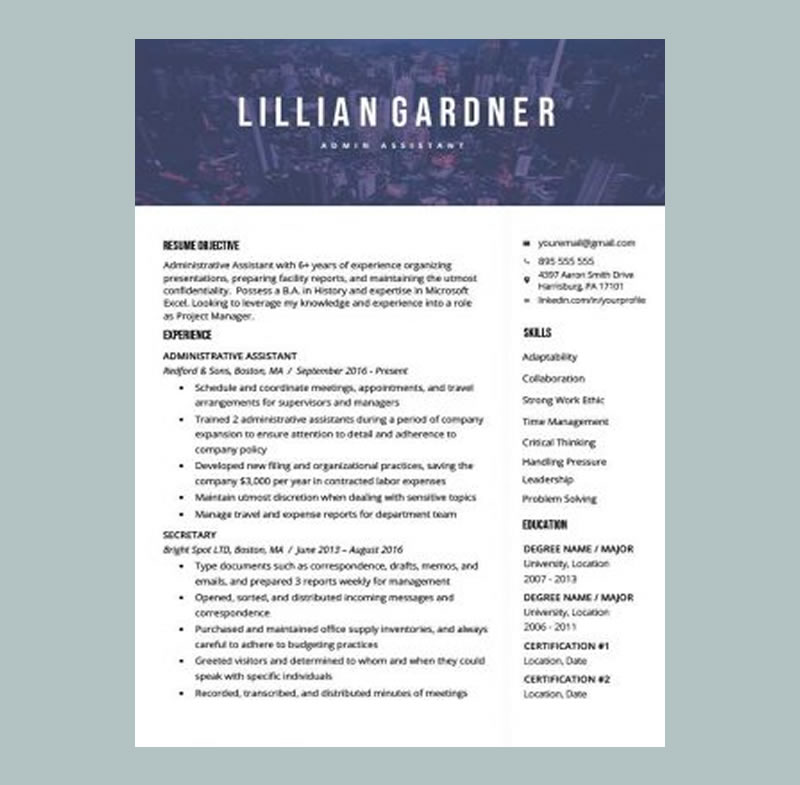
One of our most striking designs, the Majestic resume template puts your name front and center against a sleek city skyline header for a confident first impression.
That bold, attention-grabbing top section is balanced with clean, traditional formatting that keeps your experience, skills, and education easy to scan. The template uses a crisp sans-serif font for maximum readability, encouraging employers to stay engaged from the first line to the last.
We recommend the Majestic template for roles that value strategic thinking and high-level problem solving, such as consultant, business analyst, project manager, or other leadership-focused positions.
Download free templates you can open in Google Docs (recommended)
If you want more professional options, MyCVCreator provides free downloadable resume templates (and cover letter templates) in Microsoft Word format, including 1-, 2-, and 3-page versions. You can upload them to Google Drive and open them as a google documents resume template in minutes.
Use this download page: free Google Docs resume templates
How to use a Word resume template as a Google Docs resume template
Here’s the simplest workflow to turn a Word file into a polished resume template google docs document.
Step 1: Download a template
Choose based on your experience level:
-
1 page: students, entry-level, career changers with limited experience
-
2 pages: experienced professionals with strong accomplishments
-
3 pages: academic/leadership-heavy profiles, or regions where longer CVs are normal
(You can get templates from MyCVCreator’s Word template page using the link above.)
Step 2: Upload the file to Google Drive
-
Open Google Drive
-
Click New → File upload
-
Upload the
.docor.docxtemplate
Step 3: Open with Google Docs
Right-click the uploaded file → Open with → Google Docs
Step 4: Save a Docs version (optional, but smart)
To create a fully “native” Google Docs file:
-
Go to File and use the option that converts/saves as Google Docs (naming can vary slightly depending on your interface)
Now you have a true google doc cv template or google doc resume template that you can edit, share, and export.
The best ATS-friendly resume format in Google Docs (2026 settings)
If you want an ATS-safe resume format google docs, these settings are a strong default:
Page setup
-
Margins: 0.5"–1"
-
Alignment: Left aligned (avoid justified text spacing can look odd)
-
Line spacing: 1.0–1.15
-
Section spacing: add 6–10 pt after headings
Font choices (keep it simple)
-
Body: 10.5–12 pt
-
Name: 14–18 pt
-
Use one font family throughout for consistency
Resume length guidelines
-
Entry-level: 1 page
-
Mid-level: 1–2 pages
-
Senior/leadership: 2 pages (common), sometimes 3 only if required
File naming (small detail, big professionalism)
Use a clear file name:
-
FirstName_LastName_Resume.pdf -
FirstName_LastName_CV.pdf(if it’s truly a CV)
How to customize your Google Docs resume template correctly
A template helps, but your content is what gets interviews. The goal is to tailor your resume without turning it into a full rewrite every time.
1) Replace placeholder text strategically (don’t just “fill it in”)
Many people paste responsibilities and stop there. Instead, convert responsibilities into achievements.
Use this formula:
Action verb + task + tools/skills + measurable result
Examples:
-
“Reduced customer response time by 35% by building canned replies and a triage workflow in Zendesk.”
-
“Improved onboarding by creating step-by-step training docs, cutting ramp time by 30%.”
-
“Managed inventory for 1,200+ SKUs and reduced stockouts by 18% using weekly reconciliation.”
Tip: If you don’t have exact numbers, estimate carefully and keep it honest (e.g., “served 50+ customers per day,” “handled 20–30 tickets daily”).
2) Tailor your skills section to match the job post (ATS advantage)
ATS systems and recruiters scan for role-specific keywords. A good approach is to create two layers of skills:
-
Core skills (hard + job-specific): tools, platforms, technical abilities
-
Strength skills (soft + transferable): communication, leadership, problem-solving
Example (Customer Support):
-
Core: Zendesk, Intercom, Ticketing systems, Live chat, Escalation handling, CRM
-
Strength: De-escalation, Clear writing, Time management, Customer empathy
3) Use clean, ATS-safe headings
These headings are widely recognized and safe across ATS tools:
-
Professional Summary
-
Core Skills / Skills
-
Professional Experience / Work Experience
-
Education
-
Certifications
-
Projects (optional)
-
Volunteer Experience (optional)
Avoid creative headings like “Where I’ve Been” or “My Journey” for most ATS-driven applications.
4) Keep formatting consistent in Google Docs
Consistency is what makes your resume look “expensive” even when it’s free.
Quick checks:
-
One font family
-
One bullet style
-
Consistent date format (e.g.,
Jan 2024 – Dec 2025) -
Same spacing between sections
-
Same bold/italics rules (e.g., company bold, job title normal)
5) Don’t over-design (the #1 template mistake)
Many pretty templates fail when:
-
exported to PDF
-
parsed by ATS
-
copied into an application form
Avoid:
-
icons for contact info
-
text boxes
-
multi-column experience sections
-
graphics-heavy headers
If your industry is design/creative and visuals matter, keep a clean ATS resume and include a portfolio link.
How to share your resume the right way (without losing control)
Google Docs makes collaboration easy use it carefully:
-
Share a view-only link when asking for feedback
-
Only allow editing for someone you fully trust
-
Keep a master copy and duplicate versions for each job
A good workflow:
-
Resume_Master -
Resume_Product_Manager -
Resume_Customer_Support -
Resume_Operations
This keeps your base resume safe while making tailoring easier.
How to export your Google Docs resume to PDF (the right way)
Recruiters usually prefer PDF because it preserves formatting.
In Google Docs:
-
File → Download → PDF
Or: -
File → Print → Save as PDF
Before exporting, run this quick quality check:
-
Zoom to 100%
-
Check for orphan lines (single words hanging on a new line)
-
Confirm dates align neatly
-
Confirm bullet wrapping looks clean (no weird spacing)
-
Make sure links (email, portfolio) work in the PDF
Quick checklist: make your template job-ready (ATS + human-friendly)
Use this checklist before you apply:
-
✅ Standard headings (Summary, Skills, Experience, Education)
-
✅ Keywords from the job post included naturally (especially in Skills + Experience)
-
✅ Strong bullets with impact (numbers where possible)
-
✅ No photos, icons, or fancy graphics (unless your industry requires it)
-
✅ Consistent formatting (dates, bullets, spacing)
-
✅ PDF export matches the Docs layout exactly
-
✅ File name is professional (
First_Last_Resume.pdf)
FAQs: Free Google Docs Resume Templates
Are Google Docs resume templates ATS-friendly?
Some are. The best resume templates google docs use a clean, one-column structure with standard headings and no text boxes. If the template uses heavy design elements, it may look good but perform poorly in ATS scans.
What’s the difference between a Google Docs resume template and a Google Docs CV template?
A google docs cv template (a curriculum vitae template google docs) is typically longer and includes academic/research sections like publications, teaching, and conferences. A resume is shorter and focused on job-ready achievements.
Can I use a Word template as a Google Docs resume template?
Yes. Upload the Word file to Google Drive and open it with Google Docs. That’s one of the easiest ways to get more variety in layouts while keeping the Google Docs workflow.
Where can I download free templates that work in Google Docs?
You can download free Word templates from MyCVCreator and open them in Google Docs: https://www.mycvcreator.com/word-template
Also Check Out
Free Google Docs Cover Letter Templates: The Complete Guide
How to Find a Good Resume Writer
Best Job Search Sites for 2026 : How to Use Them to Get Hired Faster
30+ Common Job Interview Questions and Answers (With Ready-to-Use Templates)