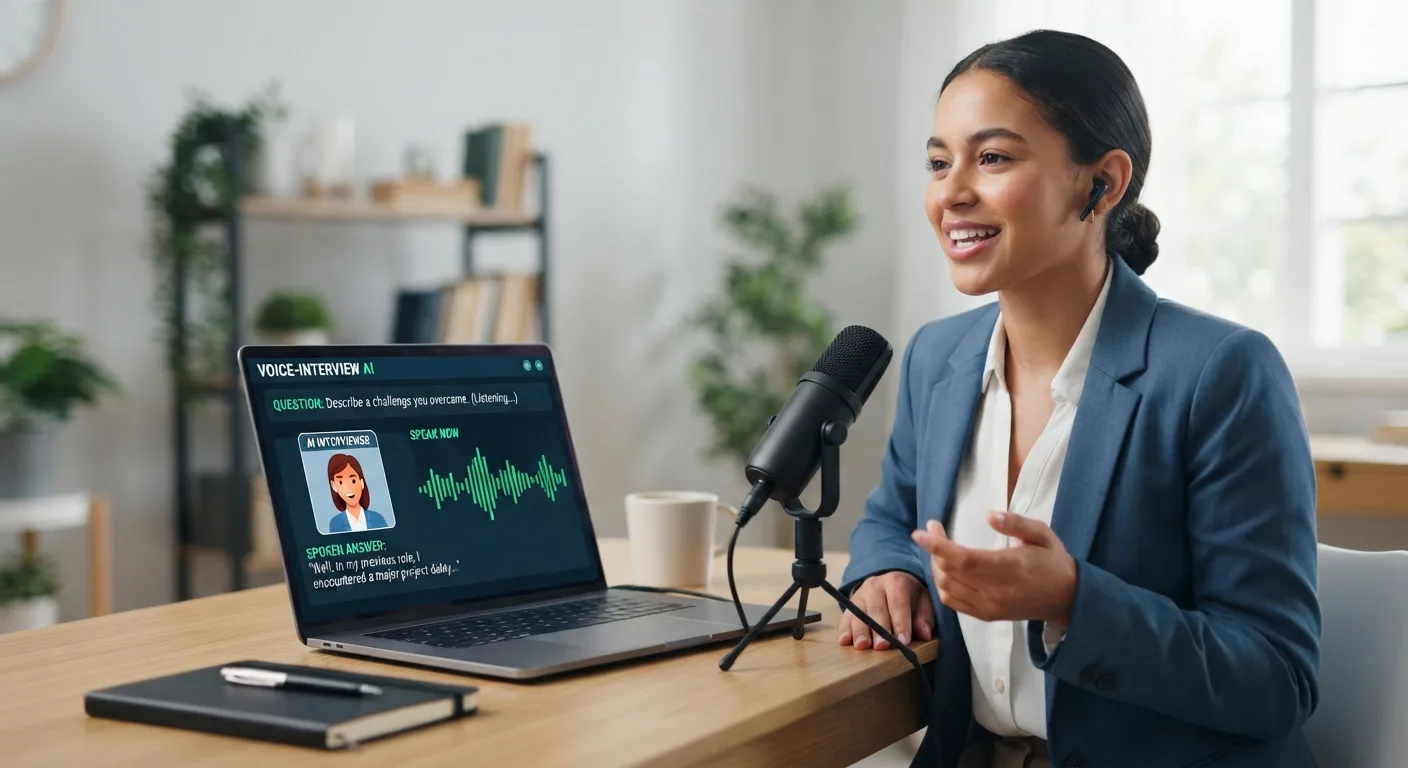
Is There a Best AI Online Interview Answer Generator That Needs No Typing
Typing during an interview shatters eye contact and chips away at your confidence. Nine desktop or browser-based AI interview answer generators now listen to each question, read your résumé, and show short cues before you respond, with no typing. This guide compares those live copilots, explains when pure prep works better, flags privacy and employer-permission traps, and lists each tool’s published prices.
If you ask which no-typing AI interview answer generator is the clear winner, the honest reply is, “It depends on the help you need.”
“No typing” covers three workflows:
automatic question capture (hands stay on the table),
voice or hot-key triggers, and
typed prompts that only look hands-free.
This guide focuses on the first workflow, so you’re comparing true apples to apples.
Quick picks at a glance: Interview Copilot for straight desktop use, Final Round AI for an all-in-one prep-plus-live suite, Interviews Chat when cost matters most, LockedIn AI for device or model flexibility, ParakeetAI for one-off calls, Verve AI when the screen matters as much as the mic, Interview Sidekick if you want a massive question bank, Beyz AI for phone-heavy processes, and Sensei AI if you want free test sessions before you pay.
The 9 live AI interview answer generators at a glance
Looking for a five-second way to see which no-typing AI interview answer generator fits your setup? Check the grid below. Prices are as each vendor publishes them; “from” marks the lowest advertised rate.
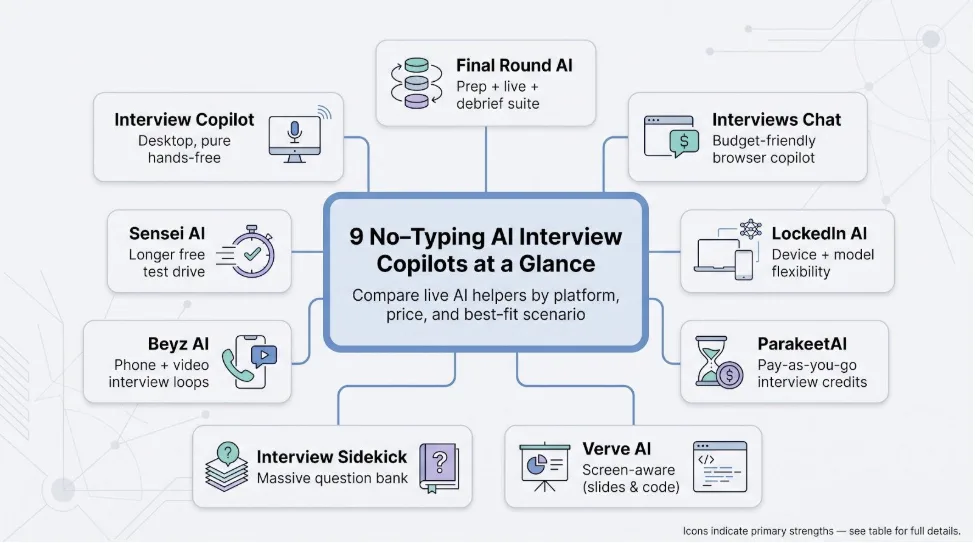
Scan the “Best when you…” column to shortlist two or three tools, then jump to the detailed reviews that follow.
Interview Copilot: best direct match for hands-free desktop interviews
Interview Copilot keeps the core promise of any no-typing AI interview answer generator: you speak, it listens, and résumé-based prompts appear on screen while the interview runs.
The native desktop app for macOS and Windows captures system audio from Zoom, Google Meet, Microsoft Teams, or Webex, detects each question, and shows guidance from your résumé and job description in an on-screen overlay. No bot joins the call, though you’ll need an internet connection.
Setup is short: install the app, add your résumé and the job description, and start a session. Glance mode offers short speaking points to help you keep eye contact. A shortcut can send a coding task, diagram, document, or job post on screen for analysis, and the coding helper outlines approach, complexity, and trade-offs.
Pricing is simple: $49/month or $149/year. Both plans include every feature, with no credits and no session limits. The app is free to download and test, but a live interview needs a subscription. You can cancel any time; paid fees aren’t refunded.
The company says prompts appear in under a second. For privacy, the company says interview audio streams for transcription but isn’t stored; transcript segments and analyzed screenshots stay in your account; data doesn’t train public models, and personal info isn’t sold. The company also says the overlay never appears in screen shares, recordings, or screenshots, even when you share a full monitor, and no Dock or taskbar icon gives it away. It adds that this protection does not cover every managed device or proctoring system. The app requires Windows 10 version 2004 or newer (or macOS), and supported interview languages aren’t published. If you want a desktop tool that works without hot keys or pasted text, Interview Copilot is the most direct match.
Final Round AI: best all-in-one preparation, live, and debrief workflow
Final Round AI positions itself as a no-typing AI interview answer generator that covers the entire loop: rehearsal, real-time prompts, and post-call review.
The desktop app for macOS and Windows starts with Goals: upload your résumé and the job description, and the platform builds a prep checklist and practice scenarios. During the real interview, it listens for questions and shows answer suggestions in a private window, with no bot joining the call. When the meeting ends, an automatic debrief reviews how it went.
Pricing is tiered: the Free plan covers goals and materials, while Final Round AI Pro starts at $25/month (“$25+/mo” on its site) with unlimited live sessions. There is no free trial for live help.
Stealth Mode, on by default, is marketed as hiding the app from screen sharing and recording in Zoom, Meet, Teams, and more.
Choose Final Round AI if you want one workspace for practice, live help, and review, and you're willing to pay for that breadth. Plan extra time to explore settings; the suite includes more toggles than a single-purpose copilot.
Interviews Chat: best low-cost door into live AI help
Interviews Chat aims to be the most affordable no-typing AI interview answer generator you can open in a browser. Use the web version, the optional Chrome extension, or the Copilot Desktop app, and you start with 30 free credits and no credit card (one credit equals one minute of Copilot or one Copilot suggestion).
During a real interview it listens, transcribes, and offers answers as STAR answers, bullet points, or follow-up questions to ask. The company says it works with Google Meet, Zoom, Microsoft Teams, and other meeting platforms; for phone interviews, you open the web version on a separate device. You can also compare suggestions from OpenAI GPT, Anthropic Claude, Google Gemini, Alibaba Qwen, and xAI Grok models.
Pricing is simple:
Starter: $19 a month for 1,000 credits
Booster: $29 a month, unlimited
Pro: $69 every three months, unlimited
On Starter, credits count Copilot minutes or suggestions, so a long technical round uses more of them than a short screen.
Privacy wording is unusually direct: the company says it uses end-to-end encryption, does not store any audio or video, and processes both in real time only for the duration of the browser session. These are still vendor claims until an independent audit appears.
Choose Interviews Chat when you need a safety net that spares both your CPU and your budget, but remember that a long technical grilling may burn through free credits faster than a calm behavioral chat.
LockedIn AI: best for device and model flexibility
LockedIn AI suits candidates who jump between gadgets yet still want a no-typing AI interview answer generator. It offers a desktop app for Windows and macOS, a web app, and iOS and Android listings; wherever you launch it, the tool listens for questions and shows answers automatically.
Pricing
Free to start, no credit card required.
Paid options are Unlimited, Credits, and Lifetime plans. Credits are used for each minute of a session and never expire. Plan prices load on its pricing page, so check the current figure before checkout.
Flexibility goes beyond hardware. LockedIn says it runs on the latest models, naming ChatGPT, Gemini, Claude, DeepSeek, and Grok, with web search built in. LockedIn Duo lets you invite a trusted friend to help during a live interview, and a VS Code and Cursor integration sends selected code to the copilot.
One setup note from its FAQ: on macOS, the web app can share only Chrome tabs, so run your video call in Chrome or use the desktop app (macOS 13.1 or later; Windows 10 or later).
Choose LockedIn AI if you value device freedom and model choice. Just set aside time to compare its plans; the options can feel like a maze when your interview is minutes away.
ParakeetAI: best pay-as-you-go choice for one-off interviews
ParakeetAI is one of the few no-typing AI interview answer generators you can buy by the call instead of the month. Credits convert directly into live call time, and half a credit covers a 30-minute call session:
1 credit: $38
ADVERTISEMENT3 credits: $59 total (about $20 per credit)
Unlimited: $149.90 a month, or $78 for a single week
Launch the desktop app for Windows or macOS, desktop Chrome, or the mobile-optimized web version on iOS and Android, and answers appear automatically from the call audio. A first 10-minute session is free. Paid options include what it calls “Full privacy mode”, and its privacy policy names its AI and infrastructure providers, including Speechmatics, OpenAI, Google, Anthropic, and AWS.
If your calendar holds just a couple of unpredictable interviews, ParakeetAI lets you pay once, get help, and walk away without a subscription.
Verve AI: best when screen content matters as much as spoken words
Verve AI reads what’s on your screen as well as what you and the interviewer say. Its Snap and solve feature captures any question on your screen for an instant answer, and live on-screen support covers coding rounds.
Pricing (Standard plan)
$44.99 for one month, with five 60-minute copilot sessions
$16.99 per month when prepaid annually
A free plan includes three 15-minute copilot sessions a month, and Pro ($84.99 a month) makes sessions unlimited.
Stealth mode is marketed as visible only to you during a screen share. Verve lists Zoom, Google Meet, Microsoft Teams, and Webex support.
Verve runs on Mac, Windows, iPhone, and in the browser. If your interviews rely on Figma boards, slide decks, or live code, Verve’s screen capture may be worth a look, but read the privacy fine print first.
Interview Sidekick: best when you want a massive question bank alongside live help
Interview Sidekick pairs a large question bank with a no-typing AI interview answer generator that listens during the call and matches each prompt to résumé-grounded bullets.
Free tier: a 2-minute test of the real-time assistant, plus limited prep and question bank access.
Paid plan: Ultimate Sidekick lists at $160 a month, or $80 a month with the code SAVE50 at checkout. It unlocks unlimited real-time assistance, a 10,000+ question bank, and Code Mode for live coding interviews. The company says transcription takes under two seconds.
Sidekick saves full interview transcripts with feedback, a helpful reflection tool but also a privacy question. Ask how long transcripts are kept and how to delete them if your interviews involve NDA material.
Check the renewal price before checkout, since the discount comes from a code.
Choose Interview Sidekick if you learn best by drilling a large question set in advance and want those same cues delivered live, but pair it with a clear data-deletion plan when confidentiality matters.
Beyz AI: best for phone interviews and mixed video-plus-voice loops
Beyz AI puts voice calls on the same level as Zoom or Google Meet: alongside its desktop app for Mac and Windows, its plans include a phone interview assistant.
Pricing
Monthly: $49.99
Quarterly (God plan): $32.99 per month
Semi-annual (Titan plan): $24.99 per month
The $49.99 monthly tier skips the coding assistant, while quarterly and semi-annual plans include it.
The monthly plan also limits uploads to your résumé. Those rules nudge you toward multi-month plans, so match the commitment to your job-search timeline.
The privacy policy, dated April 26, 2024, names no AI providers and states no retention period. Ask for written details if confidentiality is critical.
Choose Beyz AI when your calendar still includes voice-only screens or a mix of audio and video. Double-check that your chosen tier covers coding support and lines up with how long you expect your search to last.
Sensei AI: best if you want a free test drive before paying up
Sensei AI’s free plan includes 15-minute Copilot sessions with no payment, enough to see how it handles a few real questions before you commit.
Set it up with your role, your résumé, and the personal stories you want surfaced under pressure; Sensei says its answers are tailored to all three. It works with Zoom, Microsoft Teams, and Google Meet calls, and lists a Coding Copilot add-on.
Pricing
Free: 15-minute Copilot sessions
Pro month to month: $89, with unlimited Copilot sessions
Pro billed annually: $24 per month
Marketing calls the tool “fully undetectable” and carries a “Guaranteed to land your dream job” banner. Treat both as marketing, and run a practice session on your own hardware before game day.
Pick Sensei AI when you need a free test drive to expose lag, hallucinations, or UI quirks, then decide quickly whether the higher ongoing cost feels worth it.
Three alternatives if you prefer preparation or coaching over stealth answers
Hedy AI: real-time coaching without scripted answers
Hedy AI is a general conversation coach rather than an interview-only answer generator. Launch the app on Mac, Windows, iPhone, or Android, and it shows real-time talking points and suggestions, such as a nudge to highlight your impact with metrics.
Pricing
Free tier: up to 5 hours a month
Pro: $12.99 monthly, $99.99 yearly, or $299 one time, with unlimited sessions
The company says your audio never leaves your device, cloud analysis is transient and never used to train AI models, and an optional Local AI Processing mode runs everything on the device.
Use Hedy when you want feedback on delivery but still craft stories yourself.
ChatGPT workflow: flexible DIY prep that only costs time
With a free ChatGPT account you can:
Paste your résumé and the job description.
Ask for likely behavioral, technical, and curve-ball questions.
Answer aloud, then request a STAR-method critique.
Save ChatGPT’s tightened bullet reminders in a notes app for quick review on interview day.
The workflow is manual and free, and it respects employer policies that ban live AI prompts because you rely on memory during the real call.
InterviewPro.ai: build polished STAR stories before recruiters call
InterviewPro.ai is a free resume builder and interview practice app. It drafts personalized STAR-method answers based on your experience and achievements, and adds role-specific practice questions and structured interview training.
Its site invites you to get started free; confirm any paid features before signing up. Treat InterviewPro.ai as a story-shaping coach when company rules forbid live overlays but you still want well-structured answers ready.
A local-first tool to watch
SpeechShield: local models meet interview prompts
SpeechShield is a Mac interview copilot that can run its AI on your own machine. It needs an Apple-silicon Mac (M1 or later) on macOS 26 or later. Load your résumé and the job description, then pick a provider for transcription, answers, and translation: free macOS speech services, your own OpenAI key, a Claude Code or Codex CLI, or a local model through Ollama. The company says that once on-device models are downloaded, audio never leaves your Mac.
Why it matters
Local processing can strengthen privacy over cloud tools, and bring-your-own-model support may lower ongoing fees.
Caveats
Requires Apple-silicon hardware; Intel Macs, Windows, and Linux aren’t supported
The free plan includes a one-time trial of its hosted AI (60 minutes and 50 answers) plus unlimited use with your own API key or local CLI; Pro costs $159 a year ($13.25 a month)
Answer quality depends on the model you choose
Keep SpeechShield on your radar if you need Mac-only, privacy-first help and you’re comfortable choosing and managing your own models.
Tools commonly confused with interview answer generators
Google Interview Warmup: no longer at its old address
Google’s free Interview Warmup once offered insights on job-related terms and talking points, but its old grow.google address now redirects to a general interview-tips article on Grow with Google. Any list that still ranks it alongside live, no-typing AI interview answer generators is out of date. If you liked its lightweight coaching style, try the ChatGPT rehearsal flow or Hedy AI’s real-time talking points.
HireVue: employer-side interviewing, not a candidate copilot
HireVue sells on-demand video screens and assessments to employers, and in June 2026 it launched HireVue AI Interviewer, which runs two-way voice interviews with applicants. Candidates log in, answer timed or spoken questions, and wait for the review. HireVue never feeds live prompts to job seekers.
If your next round is on HireVue, focus on clear STAR stories and steady delivery, not a stealth overlay. InterviewPro.ai or the ChatGPT workflow can help polish responses ahead of time.
Do no-typing interview answer generators actually work?
A no-typing AI interview answer generator helps only when every link in an accuracy chain stays intact:
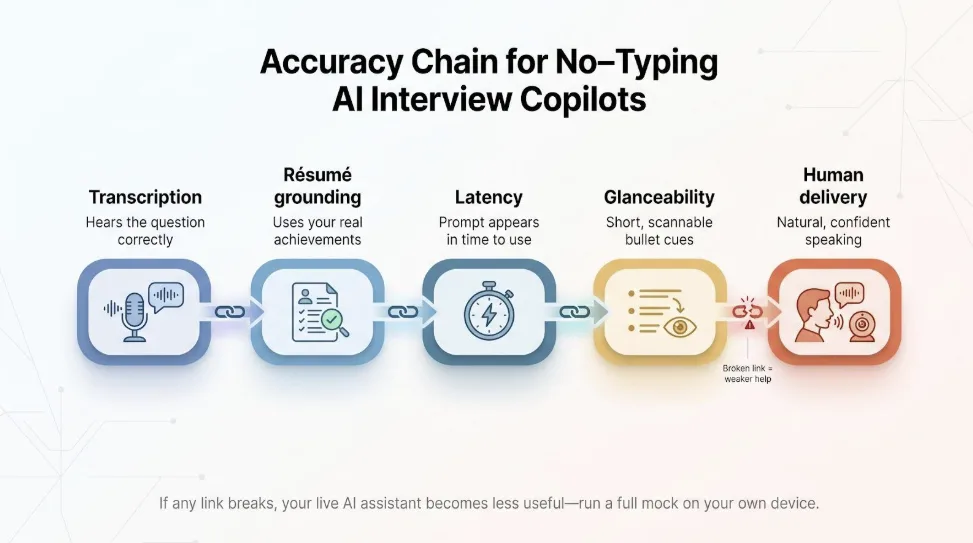
Transcription. The tool must hear the question correctly. Mishearing “lead a 12-person data team” as “read a 12-page data sheet” wrecks the answer before you speak.
Résumé grounding. Prompts need to pull facts you truly achieved, not inflate forty-percent revenue growth to fourteen or the reverse.
Latency. A cue that arrives four seconds late feels like twenty when a recruiter is watching; by then you’re already talking.
Glanceability. Short bullets help you keep eye contact. Paragraph-length scripts tempt you to read and break rapport.
Human delivery. Even a perfect bullet fails if you sound robotic. Practice until cues trigger genuine stories, not word-for-word recitals.
Vendor speed and accuracy figures are self-reported, so treat live copilots as assistants, not silver bullets. Run a practice session on your own device; if any link breaks, fall back on well-rehearsed stories.
Privacy audit: what happens to your voice, résumé, and transcripts
Marketing terms like encrypted or stealth mean little if your stories linger on a server or train future models. Check four layers:
Audio path. Some tools, Interviews Chat for example, say they don’t store audio or video and process it only for the browser session; others send audio to cloud speech-to-text services.
Transcript retention. Some tools, Interview Sidekick among them, save full transcripts for replay. Great for reflection, risky for NDAs. Ask how to delete them.
Model training. “We don’t train on your data” should cover all subprocessors. Silence in the policy usually signals permission.
Detection vs. invisibility. An overlay hidden from screen share can still be flagged by monitoring software that checks which apps run on your machine.
Save the vendor’s policy PDF on the day you subscribe; terms change faster than pricing.
Is using a live AI interview assistant cheating?
Ethics comes down to consent. If the company labels the round “AI-enabled,” feel free to highlight the tool. If policies ban outside help, a covert overlay crosses the line, and detection products like Zero Assist say they flag known AI assistant apps running on the candidate’s machine. Follow this safer route:
Ask the recruiter, “Are outside AI tools permitted for this round?”
ADVERTISEMENTIf no, rely on prep options such as InterviewPro.ai or the ChatGPT workflow.
If yes, share which copilot you’ll use and why; that transparency shows the judgment hiring managers value.
How to use AI without sounding scripted
Treat every prompt as a cue, not a teleprompter. Glance, grab the idea, look back at the camera, and speak in your own cadence. Natural rises and fillers show you’re thinking, not reading.
Build a story bank. Six to eight STAR or PAR stories cover most follow-ups. Tag each with a single trigger phrase such as “deadline crunch,” “team conflict,” or “data migration.”
Verify numbers. If the overlay says you “cut costs by forty percent” but the real figure is fourteen, correct it on the spot; detail questions will expose the mismatch.
Mock the follow-ups. Ask a friend, or ChatGPT, to poke holes in each story so you always have metrics and next steps ready.
Pause on purpose. Let the question land, count one beat, glance at the cue, then answer. Controlled silence feels thoughtful, not slow.
Used this way, a no-typing AI interview answer generator is a safety net, not a ventriloquist.
Quick FAQ
Which tools need no typing?
All nine live copilots (Interview Copilot, Final Round AI, Interviews Chat, LockedIn AI, ParakeetAI, Verve AI, Interview Sidekick, Beyz AI, and Sensei AI) detect spoken questions automatically.
What works with Zoom, Meet, and Teams?
Every live copilot on the main list names Zoom, Google Meet, and Microsoft Teams. Interview Copilot, Final Round AI, Verve, Interview Sidekick, and ParakeetAI also list Webex. Interviews Chat, Beyz AI, LockedIn AI, and ParakeetAI also offer a phone-interview route.
Can the overlay be seen on a screen share?
Most of these vendors say their overlay stays out of screen shares. Interview Copilot says its protection does not cover every managed device or proctoring system, and monitoring software that checks running apps can still flag a copilot.
Is any option truly free?
Several tools let you try live help free: Sensei offers 15-minute sessions, ParakeetAI a 10-minute session, Verve three 15-minute sessions a month, Interview Sidekick a 2-minute test, and Interviews Chat 30 free credits. Interview Copilot is free to download and test, but a live interview needs a subscription. After the free allowance, live tools charge by credit, minute, or month.
Best pick for coding rounds?
Interview Copilot includes coding help on its $49 monthly plan, explaining approach, complexity, and trade-offs. Interview Sidekick’s Code Mode and Verve’s screen capture also help when you share an IDE; Beyz AI includes its coding assistant only on quarterly and semi-annual plans.
Is Google Interview Warmup still live?
Its old grow.google address now redirects to a general interview-tips article.
Can ChatGPT replace a live copilot?
Great for preparation, but impractical in real time because you’d need to paste every question.
Will using AI hurt my chances?
Only if employer policy forbids live assistance. When in doubt, ask for written permission; transparency beats stealth.
Conclusion: Which AI interview tool should you choose?
The “best” no-typing AI interview answer generator comes down to three things: timing, round type, and risk tolerance.
Timing. One onsite next week? A single ParakeetAI credit covers about an hour of live help without a subscription. A three-month run of phone screens? Beyz AI’s quarterly plan costs $32.99 a month.
Round type. Coding rounds need a plan that includes coding help: Interview Copilot includes it on the $49 monthly plan, while Beyz AI adds it only on quarterly and semi-annual plans. Design walk-throughs or slide talks get extra value from Verve AI screen capture.
Risk and privacy. If data retention worries you, start with Hedy AI’s on-device speech recognition or SpeechShield with a local model. When employer policy bans live AI, stick to InterviewPro.ai plus a ChatGPT rehearsal.
Fast picks
Treat the table as a compass, not a promise. Check pricing and privacy before you buy, and always run a full practice session on the same device and bandwidth you’ll use in the real interview; you’re still the pilot in command.