Basic
Basic, ATS-friendly resume template for online applications clean layout, easy parsing, and sections
View Template
Explore MyCVCreator’s full collection of professional resume templates designed for every job, industry, and experience level. Whether you’re a student, a recent graduate, a career changer, or an experienced professional, you’ll find modern, ATS-friendly designs that help you highlight your skills, work history, and achievements with confidence.
Create Your Resume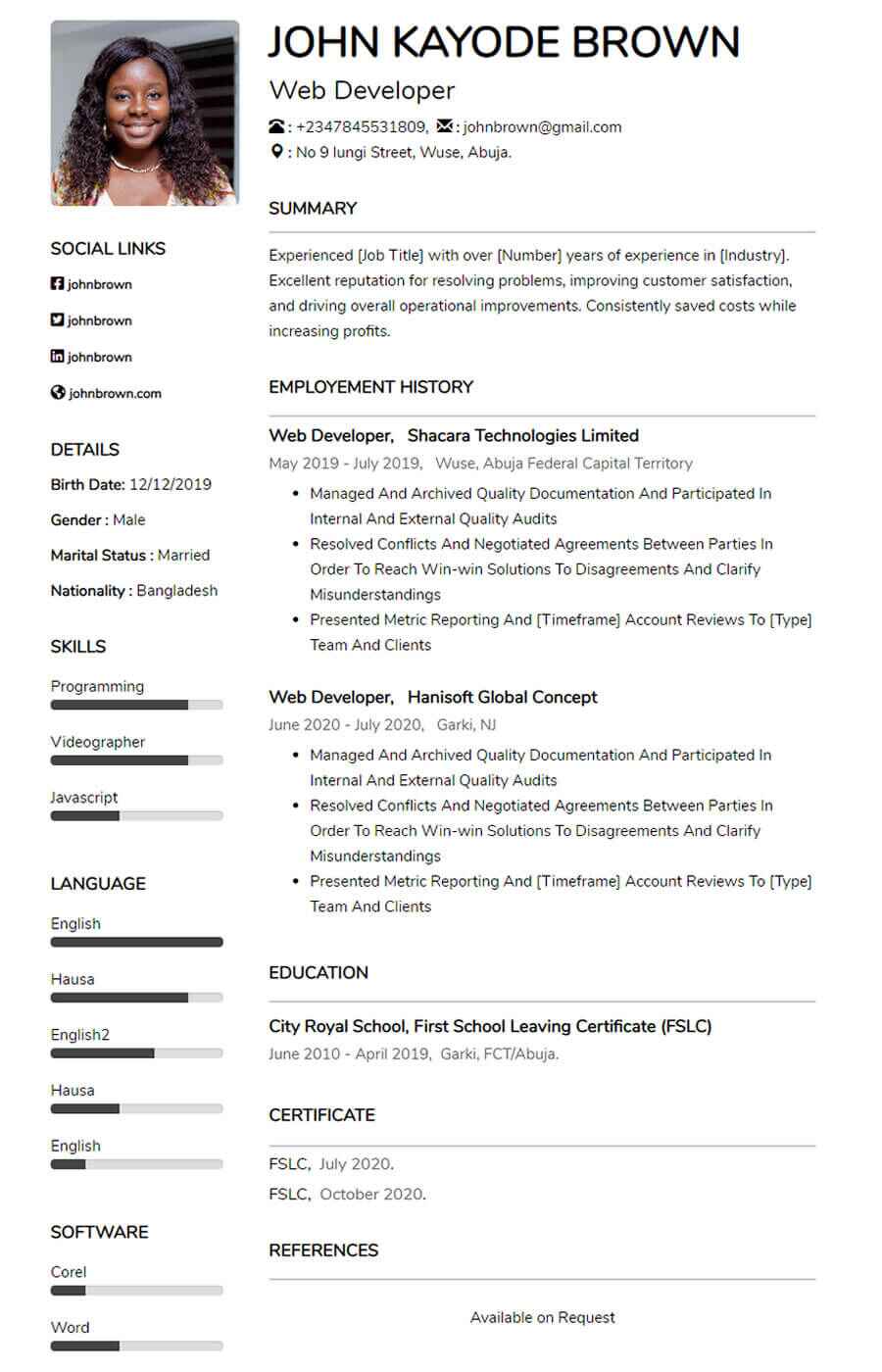
Template used: 1,186
The Pacific Resume/CV Template is a versatile, modern layout designed to work equally well for experienced professionals and first-time job seekers. Its clean two-column resume structure helps you organize information efficiently so your most important qualifications (like skills, experience, and education) are easy to find at a glance. The result is an attractive, recruiter-friendly one-page CV that stays clear and readable without looking crowded.
Pacific is especially useful when you want to include more details tools, certifications, languages, and accomplishments while keeping the layout balanced. It’s a strong option for online applications, job portals, and PDF submissions where clarity and formatting can influence first impressions.
Two-column layout that uses space efficiently
Clean, simple formatting that stays readable on one page
Great for both entry-level and experienced candidates
Easy-to-scan structure for recruiters and hiring managers
Professional look that fits most industries and job roles
A clear header for your name, professional title, contact details, and location—plus optional portfolio and LinkedIn links.
A short professional summary that highlights your strengths, experience level, and the value you bring in 2–4 lines.
A structured work history section (reverse-chronological) that supports achievement-focused bullets and measurable results.
A clean education section for degrees, schools, dates, and optional honours or relevant coursework.
A dedicated area for key skills perfect for listing technical skills, role-specific abilities, and core competencies.
Optional section to add a professional personal touch, especially when interests support culture fit or the role.
A tools section for programs and platforms you use confidently (e.g., Excel, Google Workspace, CRMs, design tools, analytics tools).
A structured section for professional certifications and training, listed with issuer and year.
A place to highlight recognition, honours, and performance awards that strengthen credibility.
Language proficiency listed clearly useful for multinational roles and customer-facing jobs.
Ideal for academic, research, writing, or technical candidates—add title, platform/journal, and year.
A highlight area for standout wins, major projects, milestones, and measurable achievements.
Professional memberships, associations, and industry groups that add authority and credibility.
Flexible space for volunteering, trainings, conferences, licenses, relocation availability, or work eligibility (when relevant).
A customizable section you can rename based on your needs, such as:
Projects
Portfolio Highlights
Leadership
Volunteer Experience
A clean references area (or “Available upon request,” depending on your application requirements).
Optional, based on country/industry norms includes space for a professional photo and links like LinkedIn, portfolio, GitHub, or Behance.

Basic, ATS-friendly resume template for online applications clean layout, easy parsing, and sections
View Template
Bela is a modern, ATS-friendly CV template with a bold black-and-white header clean, professional se
View Template
Mula is an elegant, ATS-friendly CV template with a sleek two-column layout and subtle color accents
View Template
Kaly is a modern, ATS-friendly two-column CV template with customizable colour accents ideal for sho
View TemplateQuick answers about choosing, customizing, and using resume templates on MyCVCreator.
A resume template is a ready-made design layout that helps you present your skills, experience, and education in a clean, professional format—without needing design skills.
Browse resume templatesYes. The templates are built with clear sections and easy-to-scan structure to work well for both recruiters and ATS (Applicant Tracking Systems).
Pick a template that matches your industry and seniority:
• Clean/simple: best for corporate roles and ATS clarity.
• Modern/creative: good for design, media, and digital roles (keep it readable).
• Executive layouts: best for senior and leadership applications.
You’ll find multiple styles such as Graphic, Corporate, Social, Plain, and more—plus premium executive options. Each template includes a “View Template” button so you can select and start quickly.
Yes. Some templates are premium (often executive-style designs). If a template is premium, you’ll see it presented as a premium option in the template list.
Yes. You can tailor sections like Summary, Skills, Experience, and Education to match the job. The best results come from editing your content to include job-specific keywords and measurable achievements.
Yes. MyCVCreator allows you to create a cover letter using the same template style as your resume so your application looks consistent.
View cover letter templatesTo save your progress and download your finished resume from the builder, you’ll typically need an account.
Create an accountChoose a template, fill in your details in the resume builder, then download your resume when you’re done.
Go to the resume builderYes. It’s smart to update your resume anytime you gain a new skill, complete a project, or change jobs. Keeping it updated helps you apply faster when opportunities come up.