Basic
Basic, ATS-friendly resume template for online applications clean layout, easy parsing, and sections
View Template
Explore MyCVCreator’s full collection of professional CV templates designed for every job, industry, and experience level. Whether you’re a student, a recent graduate, a career changer, or an experienced professional, you’ll find modern, ATS-friendly designs that help you highlight your skills, work history, and achievements with confidence.
Create Your CV Now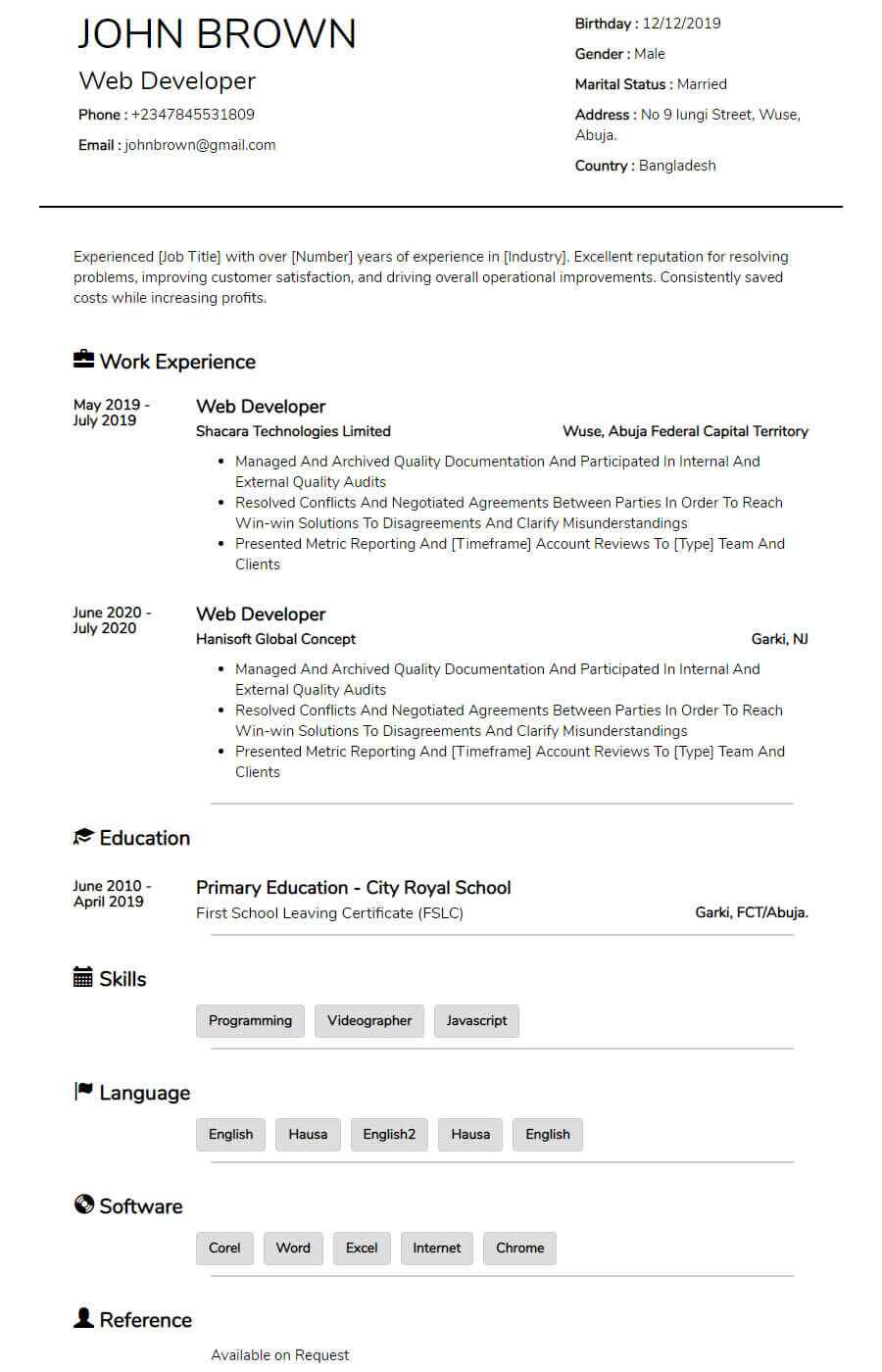
Template used: 143,433
The Blogger template is a timeless, easy-to-read CV design that balances a traditional layout with just enough personality to feel modern. It uses centred section headings and a clean horizontal line to separate each part of your resume, creating a neat structure that’s effortless to scan. The result is a format that feels organized, professional, and calm perfect for recruiters who want to quickly find key information without visual clutter.
What makes the Blogger template especially appealing is its customizable colour scheme. You can keep it classic (black/grey) or add a subtle accent colour to match your personal brand without making the CV look flashy or distracting. This makes it ideal for applicants who want a professional look with a gentle, confident touch.
Classic CV structure recruiters instantly recognize
Centred headings + section dividers for strong visual organization
Clear, consistent formatting that improves readability
Customizable colour accents for a subtle personal style
Great for printing and digital use (PDF uploads, email applications, job portals)
A clean header area for your name, job title, contact details, and optional location—plus social links if you want (LinkedIn, portfolio).
A short introduction that captures your professional identity, strengths, and top value in 2–4 lines.
Your work history displayed in a clear, structured format. Ideal for achievement-focused bullet points that show measurable impact.
A straightforward section for your degrees, schools, and graduation years. You can also add honours or key coursework if relevant.
A dedicated skills block that makes it easy for recruiters and ATS systems to spot your strongest job-related abilities.
An optional section that adds human personality best used when relevant to the role or when it supports culture fit.
A focused place for tools and platforms you use confidently (e.g., Excel, WordPress, Google Workspace, CRM tools, design tools).
Professional qualifications listed neatly with issuer and year, helping employers validate your training quickly.
A section to highlight recognition such as scholarships, employee awards, academic honours, and performance distinctions.
Languages listed with clear proficiency levels useful for international roles and customer-facing jobs.
Perfect for writers, researchers, academics, or technical professionals. Add title, platform/journal, and date.
A spotlight section for big wins key achievements, standout projects, leadership results, and milestones worth emphasizing.
Professional memberships and associations that strengthen credibility and show industry involvement.
A flexible section for extras like volunteering, workshops, licenses, conferences, or work eligibility details (when needed).
A customizable section you can rename to fit your career path, such as:
Projects
Volunteer Experience
Leadership
Trainings
Portfolio Highlights
A simple references area either full references (if requested) or “Available upon request” where appropriate.
Optional, depending on industry/country norms. Includes a space for a professional headshot and links like LinkedIn, GitHub, Behance, or portfolio website.

Basic, ATS-friendly resume template for online applications clean layout, easy parsing, and sections
View Template
Bela is a modern, ATS-friendly CV template with a bold black-and-white header clean, professional se
View Template
Mula is an elegant, ATS-friendly CV template with a sleek two-column layout and subtle color accents
View Template
Kaly is a modern, ATS-friendly two-column CV template with customizable colour accents ideal for sho
View TemplateQuick answers about choosing, customizing, and downloading CV templates on MyCVCreator.
A CV template is a professionally designed layout (like Graphic, Corporate, Plain, or Timeless) that helps you present your skills, work history, and achievements in a clean, recruiter-friendly format.
Browse CV templatesYes. The CV templates are designed to be modern and ATS-friendly, with clear structure so recruiters (and Applicant Tracking Systems) can scan your information quickly.
To create, save, and download your CV in the builder, you’ll typically need an account. You can start by registering and then choose a template to begin.
Create your accountUse this quick guide:
• Plain: Great for corporate/remote roles and ATS clarity.
• Corporate / Graphic: Clean, modern layouts for most roles.
• Timeless / executive-style templates: Strong for senior/leadership profiles.
When in doubt, pick a clean template, then tailor your content to the job.
MyCVCreator offers a mix. Some templates are positioned as premium (for example, executive-style options like “Mark” and “Lana”), while others are available to get started right away.
Yes—templates are meant to be customized. You can adjust sections (like skills, experience, education) and tailor the content to your target role. Some templates also highlight customizable style elements (like banners/accent colors).
Yes. MyCVCreator supports building a cover letter using the same template style as your CV, so your application looks consistent and professional.
Go to the CV builderAfter you choose a template and complete your details in the builder, you can download your CV and start applying. If you prefer editable Word files, you can also check the Word Template section on MyCVCreator.
Word templatesYes. It’s best practice to keep your CV updated—when you gain a new skill, finish a project, or get a new role, you can revisit and refresh the content so you’re always ready to apply.
Yes. MyCVCreator is designed to work on different devices, so you can start a CV on your phone and continue on a tablet or laptop when convenient.