From One Photo to a Speaking Video CV: We Tested Kling 4.0 on Job Application Intros
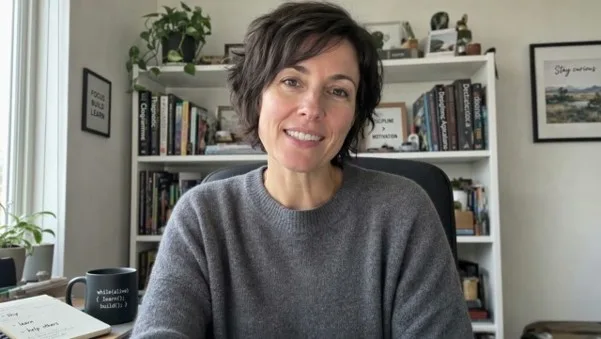
A frame from a ten-second video introduction generated by Kling 4.0 from a single portrait photo.
Recruiters read hundreds of CVs for every role, and most of them look the same. A short video introduction is one of the few ways a candidate can show personality, confidence and communication skills before the first interview. Some job platforms now invite candidates to add one, and many creative and client-facing roles practically expect it. Yet very few applicants record one. Filming yourself is awkward, getting the lighting and sound right is hard, and recording a clean take of even twenty seconds can take an afternoon.
Kling 4.0 is a video generation model that produces clips with sound, including speech with lip sync. That raises an obvious question for job seekers: can you turn one good portrait photo into a natural, speaking video introduction, with your own words, in a minute or two? We tested it with four fictional professionals, a software engineer, a head chef, a brand designer and an intensive care nurse, and measured what matters: whether the words are exactly what you wrote, whether the person still looks like the photo, whether the voice fits, and what it costs.
The test used eleven clips and cost $18.72. Nine of the ten spoken lines were transcribed word for word, and the tenth differed only in one place name. The results also raise questions about honesty that every candidate should think about, and we cover those at the end.
How we ran the test
For each professional we created a head-and-shoulders portrait photo of the kind a candidate might take for a LinkedIn profile: a natural setting, good light, looking at the camera. We then sent each photo to Kling 4.0, model ID kling-v4, as the first frame of a clip, with a prompt containing the exact words the person should say.
The person looks into the camera and says, warmly and naturally: "Hi, I'm Priya. I build backend systems that handle millions of requests a day, and I'm looking for my next platform team." Subtle natural head movements and hand gestures, realistic lip sync, quiet room tone.
All clips were 720p. Kling 4.0 always generates sound with the video, so no extra parameter was needed. To check the speech objectively, we ran every clip through a speech-recognition model and compared the transcript with the script. We also measured when speech started and ended, using silence detection, and the median pitch of each voice. Clips took between four and seven minutes each to generate.
Test 1: four professionals, four intros
The four scripts were between 14 and 22 words long, the length of a natural ten-second introduction.
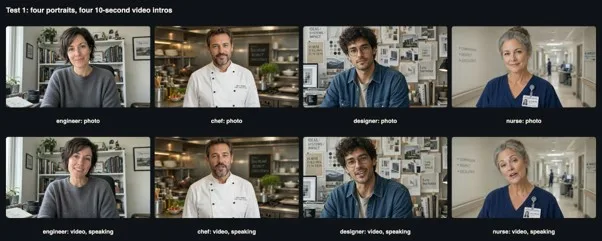
Test 1: the source photos (top) and frames from the speaking clips (bottom).
All four transcripts matched the scripts exactly. The chef said "I'm Marco. Twenty years in kitchens, from Naples to London. Today I run a team of twelve." The designer said "Hey, I'm Leo, a brand designer. I turn messy ideas into identities people remember." The nurse said "My name is Helen. I have been an intensive care nurse for twenty-six years, and I still love the night shift." Every word, in order, with nothing added or dropped.
Visually, each person kept the face, hairstyle, clothing and background from the photo throughout the clip. They behaved like people talking to a webcam: small nods, a tilt of the head, a smile at the end of a sentence, and in the engineer's case open-hand gestures while she spoke. The chef's name badge and the nurse's ID card stayed in place. Nobody's face drifted or changed shape during the ten seconds.
Test 2: timing and silence
A detail that matters when you upload a clip is where the speech sits inside it. We measured it for every clip.
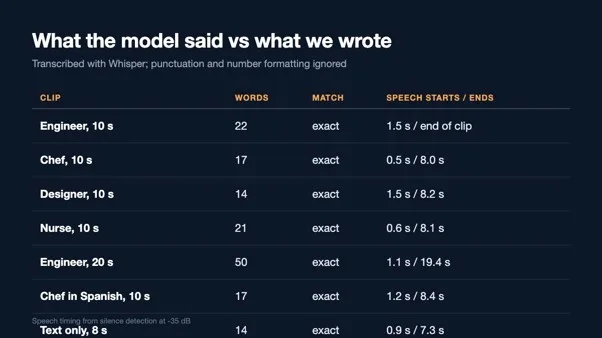
Test 2: every transcript matched, and speech started 0.5 to 1.5 seconds into each clip.
Speech started between 0.5 and 1.5 seconds into each clip, after a natural pause as the person settled. The longest script, the engineer's 22 words, filled the clip almost to the last frame. The shorter scripts finished around eight seconds, leaving about two seconds of silence at the end, during which the person simply smiled and looked at the camera. That is not a problem, but it is worth trimming: a recruiter scrolling through candidates will notice dead air. As a rule of thumb from our clips, about two words per second of clip, minus the first second, fills the time comfortably.
Test 3: a longer pitch
Ten seconds is enough for a hello. A real video CV often runs longer, so we gave the engineer a fifty-word script and a twenty-second clip.
"Hi, I'm Priya. For the last six years I have built backend systems at two fintech companies. I led the migration of our payment service to Kubernetes, cut our cloud bill by a third, and mentored four junior engineers. I am looking for a platform team that cares about reliability."

Test 3: twenty seconds, fifty words, one consistent person.
The transcript matched again, word for word, including the technical terms "Kubernetes" and "fintech". The speech was paced naturally, with short pauses between sentences, and ended at 19.4 seconds. Over twenty seconds, the engineer's appearance stayed consistent and her gestures varied, so the clip did not look like a loop. It cost $3.14, twice the ten-second price.
Test 4: the same person in another language
For bilingual candidates, an introduction in each language can be a real advantage. We asked the chef to introduce himself in Spanish.
The chef looks into the camera and says in Spanish: "Hola, soy Marco. Llevo veinte años en cocinas profesionales y hoy dirijo un equipo de doce personas." Realistic lip sync, kitchen ambience.

Test 4: English and Spanish versions from the same photo, with the same voice pitch.
The Spanish transcript matched the script. More interesting was the voice. We measured the median pitch of the chef's voice in both clips, and it was 124 Hz in each. The model gave him a consistent voice across languages without being told to, which is what makes a pair of language versions feel like the same person rather than two different actors.
Test 5: does the voice fit the person?
A mismatched voice is the fastest way for a generated clip to feel wrong. Since the voice is generated from the photo and the prompt, we checked whether it was plausible for each person by measuring its pitch.
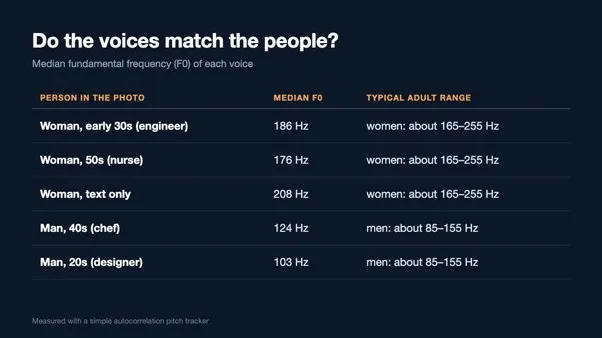
Test 5: every voice fell within the typical range for the person in the photo.
The three women spoke at a median of 176 to 208 Hz, and the two men at 103 and 124 Hz. All five fall within the typical adult ranges. Pitch is only one dimension of a voice, and it says nothing about accent or warmth, which you should judge by listening, as you can in the walkthrough video below. But it confirms that the model chose voices that fit the faces, without any description of the voice in the prompt.
Test 6: what happens without a photo
To see how much the photo matters, we asked for the engineer's introduction using only a text description of her: a woman in her early thirties with short dark hair and a grey sweater in a bright home office.
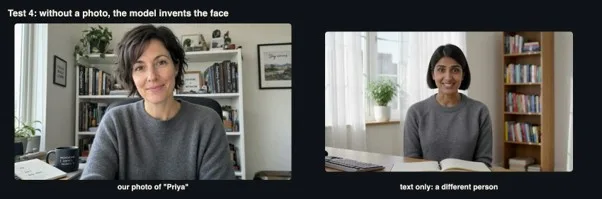
Test 6: from text alone, the model created a convincing speaker, but not the same person.
The clip was convincing on its own terms, and the transcript matched the script. But the woman in it was clearly a different person from our photo, with a different face and a longer hairstyle, sitting in front of a different bookshelf. The model built a person around the name "Priya" and the description. For a CV, this is the decisive point: only a photo makes the video show you. A text-only video introduction would show a stranger.
Test 7: b-roll from the same photo
A single talking shot can feel static, so we tested whether the same portrait could produce a second shot. We asked the designer to stand up and walk along his mood boards.
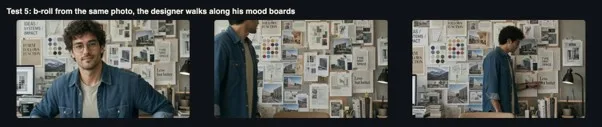
Test 7: the designer stood up and walked along the wall of boards, still recognisably the same person.
The model animated him standing, turning and walking along the boards while the camera followed, and he stayed recognisable in his denim shirt and glasses throughout. The boards behind him were expanded convincingly beyond what the photo showed. A cut from the talking shot to this b-roll and back would make a 20-second intro feel produced rather than recorded.
Test 8: names, numbers and acronyms
Technical CVs are full of words a voice model can stumble on: product names, version numbers, units and acronyms. We gave the engineer a deliberately awkward line.
"I have shipped APIs in Go and C++, cut p99 latency from 480 to 120 milliseconds, and passed the AWS Solutions Architect exam in 2025."
The transcript was exact: "I have shipped APIs in Go and C++, cut P99 latency from 480 to 120 milliseconds, and passed the AWS Solutions Architect exam in 2025." Every acronym, the "plus plus", both numbers and the year came through. For a technical candidate, that matters more than any visual detail, because a mispronounced framework name is the kind of slip a hiring engineer notices immediately.
Test 9: vertical format and 1080p
Many people will share a video CV on mobile-first platforms, so we asked for the nurse's introduction in 9:16. The clip came back at 1280 by 720, landscape, exactly like the photo. When a photo is used as the first frame, Kling 4.0 follows the photo's shape and ignores the requested aspect ratio. The fix is to crop the portrait to 9:16 before you send it.
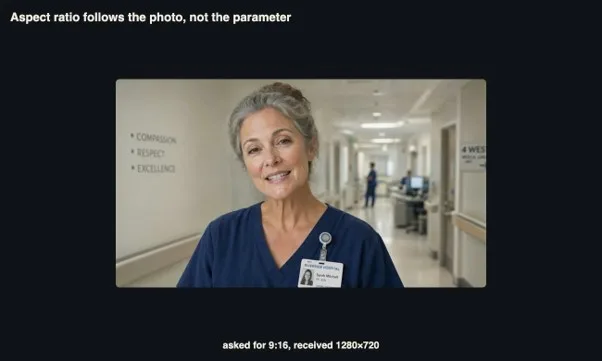
The requested 9:16 clip followed the 16:9 photo instead.
We also regenerated the chef's introduction at 1080p. The face, beard and chef's jacket were visibly sharper, and the clip cost $2.23, 42 percent more than 720p. One detail is worth listening for: the transcript of the 1080p clip read "From Nargles to London" instead of "From Naples to London", while the 720p clip had been transcribed correctly. Either the name was pronounced less clearly this time, or the transcription model misheard it. Place names and surnames are exactly where you should listen to every take before you use it.
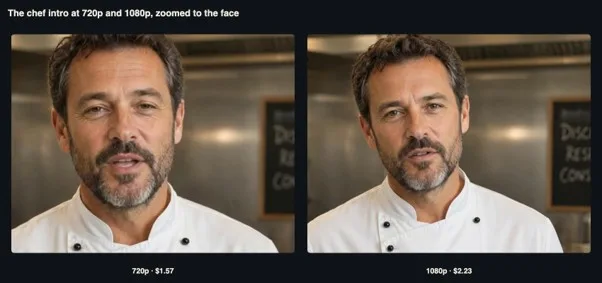
720p and 1080p versions of the same intro, zoomed to the face.
For most uses, a video CV is watched in a browser window or on a phone, where 720p is entirely sufficient. If you plan to show it full screen, or to crop it later for a vertical version, 1080p gives you the extra detail to do so.
What it costs
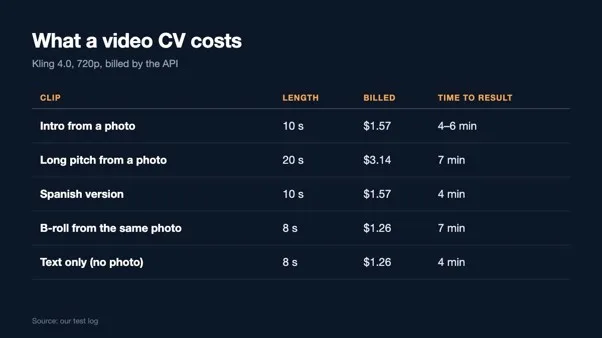
Billed cost and time to result for each clip type.
We generated every clip through the Kling 4.0 video API, which accepts a photo as the first frame and the spoken words in the prompt, and returns a clip with synchronised sound. At 720p, a ten-second introduction cost $1.57, a twenty-second pitch $3.14 and an eight-second b-roll clip $1.26. A complete video CV, an intro, a second language and a b-roll shot, costs under five dollars, and the clips take five to seven minutes each to arrive.
How to make a good one
From these clips, a few practical rules emerge for candidates who want to try this.
- Crop the photo to the format you want. The clip follows the photo's shape, not the aspect-ratio setting.
- Start with a good, recent photo of yourself. Face the camera, use soft light and choose a background that says something about your work, as the chef's kitchen and the designer's studio did.
- Write the script as you speak. Contractions, short sentences and one concrete achievement work better than a list of skills.
- Fit the words to the time. About two words per second, after the first second, filled our clips without rushing.
- Put the words in quotation marks and say "says". Every scripted line in quotes was reproduced exactly.
- Trim the start and end. Remove the silence before the first word and after the last.
- Add a second shot. A b-roll clip from the same photo makes a longer intro feel natural.
The honesty question
A generated video CV raises questions that a written CV does not, and candidates should take them seriously.
First, the video must be of you. Using your own photo, as in our tests, produces a clip of you saying words you chose. Using someone else's photo, or a generated face, to apply for a job would be deception.
Second, the content must be true. The model will say anything you write, fluently and convincingly. That makes it easy to exaggerate. Every claim in a video CV should be one you would repeat in an interview.
Third, consider telling the employer. Some recruiters will be impressed by the initiative; some organisations have policies about AI-generated material in applications. A simple line such as "video generated from my photo with an AI tool, words written by me" keeps you on the right side of both. When you are invited to a live interview, the recruiter will meet the real you anyway; the video should prepare them for that, not mislead them.
The walkthrough video
Walkthrough with the original sound of the generated clips, so you can hear the voices and lip sync (about 3 minutes).
Turning clips into a finished video CV
A finished video CV is usually 20 to 40 seconds: a short introduction, one concrete achievement and a closing line. From the clips in this test, a simple edit would be the ten-second introduction, a cut to the b-roll shot while a second line plays, and a final shot back on the person. Trim the pauses at the start and end of each clip, normalise the audio so both parts play at the same level, and add captions, since recruiters often watch with the sound off.
# trim the opening pause and the silence at the end of a 10-second intro
ffmpeg -ss 1.2 -to 8.6 -i intro.mp4 -c:v libx264 -c:a aac intro-trim.mp4
# even out the loudness
ffmpeg -i intro-trim.mp4 -af loudnorm=I=-16:TP=-1.5:LRA=11 -c:v copy intro-final.mp4
Keep the file small. A 30-second clip at 720p, encoded for the web, is typically a few megabytes, small enough to attach to an application or upload to a profile without problems. Host it somewhere stable and link to it from your CV, rather than relying on an attachment being opened.
Limitations
We generated one take of each script, so we cannot say how often a given line would be reproduced perfectly. Our transcripts come from a speech-recognition model, which can itself make mistakes, as the "Nargles" result shows. Our portraits are clean generated images; real phone photos, with uneven light or busy backgrounds, may give weaker results. We measured voice pitch, not accent or naturalness, which are better judged by listening.
Appendix: the prompts we used
For anyone who wants to repeat these tests, here are the prompts as we sent them, grouped by clip. Parameters such as duration and resolution are listed after each prompt.
k2-engineer (model: kling-v4, duration: 10, resolution: 720p)
The person looks into the camera and says, warmly and naturally: "Hi, I'm Priya. I build backend systems that handle millions of requests a day, and I'm looking for my next platform team." Subtle natural head movements and hand gestures, realistic lip sync, quiet room tone.
k2-chef (model: kling-v4, duration: 10, resolution: 720p)
The person looks into the camera and says, warmly and naturally: "I'm Marco. Twenty years in kitchens, from Naples to London. Today I run a team of twelve." Subtle natural head movements and hand gestures, realistic lip sync, quiet room tone.
k2-designer (model: kling-v4, duration: 10, resolution: 720p)
The person looks into the camera and says, warmly and naturally: "Hey, I'm Leo, a brand designer. I turn messy ideas into identities people remember." Subtle natural head movements and hand gestures, realistic lip sync, quiet room tone.
k2-nurse (model: kling-v4, duration: 10, resolution: 720p)
The person looks into the camera and says, warmly and naturally: "My name is Helen. I have been an intensive care nurse for twenty-six years, and I still love the night shift." Subtle natural head movements and hand gestures, realistic lip sync, quiet room tone.
k2-engineer-long (model: kling-v4, duration: 20, resolution: 720p)
The person looks into the camera and says, warmly and naturally: "Hi, I'm Priya. For the last six years I have built backend systems at two fintech companies. I led the migration of our payment service to Kubernetes, cut our cloud bill by a third, and mentored four junior engineers. I am looking for a platform team that cares about reliability." Natural gestures, realistic lip sync.
k2-chef-es (model: kling-v4, duration: 10, resolution: 720p)
The chef looks into the camera and says in Spanish: "Hola, soy Marco. Llevo veinte años en cocinas profesionales y hoy dirijo un equipo de doce personas." Realistic lip sync, kitchen ambience.
k2-t2v (model: kling-v4, duration: 8, resolution: 720p, aspect_ratio: 16:9)
Webcam-style video of a software engineer, a woman in her early thirties with short dark hair and a grey sweater, in a bright home office, who says: "Hi, I'm Priya. I build backend systems that handle millions of requests a day." Realistic lip sync.
k2-designer-broll (model: kling-v4, duration: 8, resolution: 720p)
The designer stands up and walks along the wall of mood boards, pointing at a poster and smiling, the camera follows him smoothly, soft studio ambience.
k2-numbers (model: kling-v4, duration: 10, resolution: 720p)
The person looks into the camera and says, warmly and naturally: "I have shipped APIs in Go and C++, cut p99 latency from 480 to 120 milliseconds, and passed the AWS Solutions Architect exam in 2025." Natural gestures, realistic lip sync.
k2-vertical (model: kling-v4, duration: 10, resolution: 720p, aspect_ratio: 9:16)
The person looks into the camera and says, warmly and naturally: "My name is Helen. I have been an intensive care nurse for twenty-six years, and I still love the night shift." Subtle natural head movements, realistic lip sync.
The bottom line
Kling 4.0 can turn a single portrait photo into a natural, speaking video introduction in about five minutes, for about $1.57 per ten seconds. In our test it reproduced nine of ten scripted lines word for word, in English and Spanish and with acronyms and numbers, kept each person's appearance from the photo, chose voices that fit the faces, and kept the same voice across languages. The practical work left for the candidate is small: write a good script, trim the silence and add a second shot. The ethical work is more important: use your own photo, say only what is true, and be open about how the video was made. If you want to try it, or compare Kling 4.0 with other video models through a single account and API key, all of them are available on apimart.ai.