

AI-Powered Hiring : How to Craft a Resume that Beats ATS
If your job search has ever felt like shouting into a void, you’re not imagining things. You submit application after application, tweak your wording, polish your experience and hear nothing back. No rejection. No interview. Just silence.
A big part of that silence is no longer human.
Behind most online job applications today sits a layer of AI-powered software Applicant Tracking Systems (ATS) and other hiring tools that act as digital gatekeepers. These systems scan, sort, and score your resume long before a human recruiter ever sees it. Nearly all large employers now use an ATS: one 2025 analysis found that around 98–99% of Fortune 500 companies rely on ATS platforms, and about 70% of large companies overall use them in their hiring processes.
At the same time, firms are rapidly adopting AI to speed up recruitment. A recent survey found that over half of companies already use AI in hiring, with adoption expected to climb to around two-thirds by the end of 2025, and many of those experiments are happening specifically in HR and talent acquisition.
For recent graduates, remote job seekers, and career switchers, this is both a problem and an opportunity:
-
It’s a problem because a poorly formatted or generic resume may be filtered out by software in seconds.
-
It’s an opportunity because once you understand how AI-powered hiring works, you can design your resume to speak the language of both machines and humans.
This article will walk you through exactly that: how to craft an ATS-friendly resume that passes the algorithm and still feels compelling and authentic when a real recruiter opens it.
The New Reality: AI-Powered Hiring Is the Default, Not the Exception
Recruiters are drowning in volume. In some white-collar roles, a single job posting can attract hundreds of applicants, with recent reports citing averages of over 200 applications per posting for many roles. Business Insider It’s simply impossible for a recruiter to read every resume line by line.
Enter two intertwined tools: Applicant Tracking Systems and AI recruiting technology.
-
ATS stores and organizes applications, parses resumes into searchable data, and lets recruiters filter candidates by keywords, skills, or experience.
-
AI screening tools sit on top of this data: they can recommend “best match” candidates, automatically screen for certain skills, and even schedule interviews or conduct basic assessments.
This is why understanding ATS is no longer optional. If you want to be seen in 2026, your resume has to cooperate with the systems employers already use.
What an ATS Actually Does to Your Resume
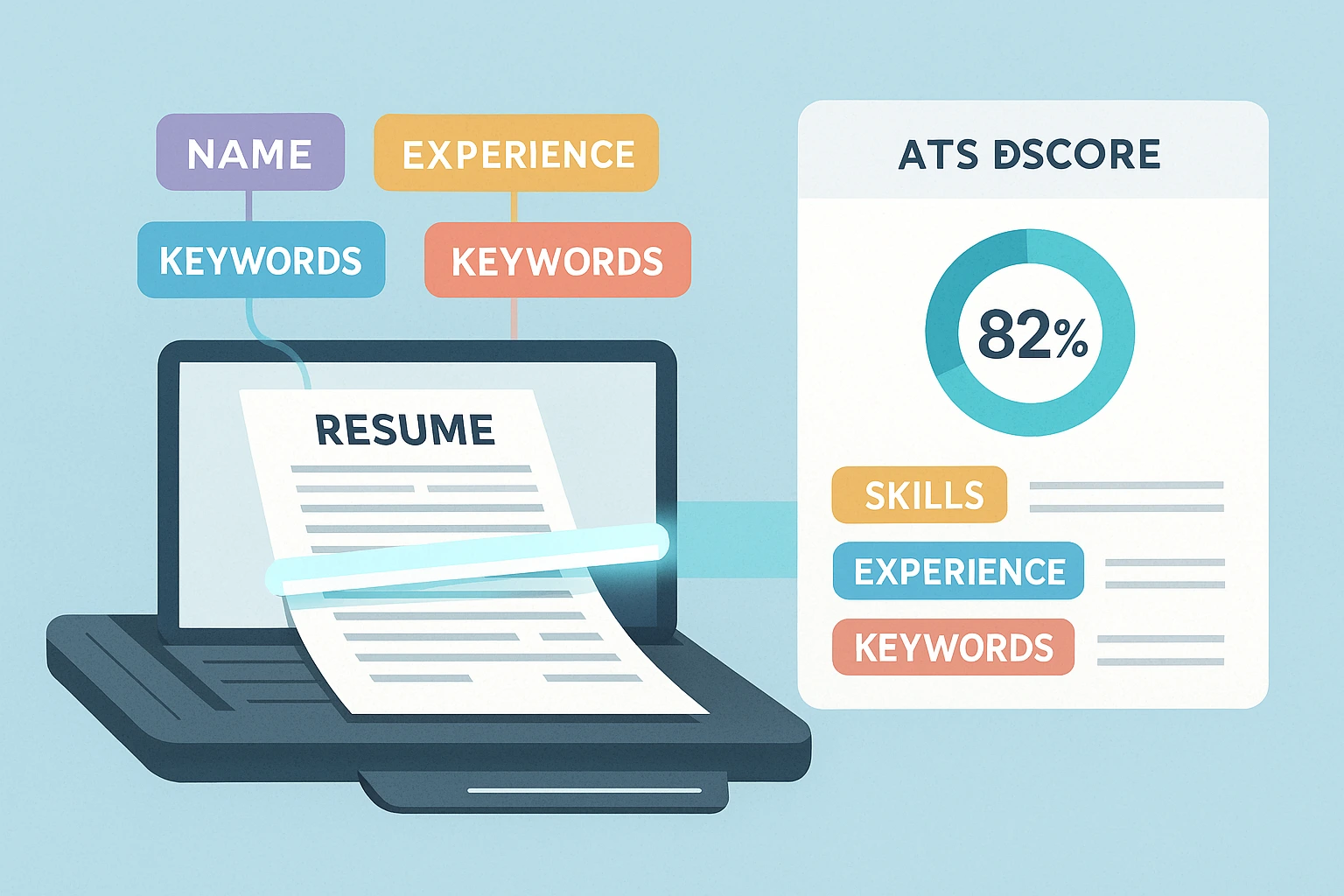
Think of an ATS as a specialized search engine plus database. When you upload your resume, the system doesn’t “read” it like a person. It breaks it apart and indexes it.
Most ATS follow a similar process:
-
Parsing
The system identifies sections like Experience, Education, Skills, Certifications and extracts the text. If your resume is too heavily designed multiple columns, graphics, text boxes this step can go very wrong, and crucial information can be dropped or scrambled. -
Structuring the data
It assigns the parsed text to fields: job titles, company names, dates, skills, qualifications, and so on. -
Indexing by keywords
The ATS stores your resume in a database that recruiters can search. They might type in “Python AND SQL AND ‘data visualization’” or filter for candidates with “3+ years of project management”. -
Scoring and ranking
Some systems use rules or AI models to score resumes against a job description. Those with better keyword matches or more relevant experience appear at the top of a recruiter’s list.
Only after this filtering does a human usually step in.
So the real question for you is:
If my resume were just a pile of text in a database, would it still clearly show that I match this job?
If the answer is “not really,” you’re losing out before your skills get a fair shot.
Step One: Choose an ATS-Friendly Resume Format
Your design choices can make or break ATS parsing. Many visually beautiful resumes are simply unreadable to these systems.
Use a clean, simple structure
For online applications, aim for a single-column layout. Keep it straightforward:
-
Contact details
-
Professional heading or summary
-
Skills
-
Experience
-
Education
-
Optional: Certifications, Projects, Volunteer Work
Use familiar headings Professional Summary, Work Experience, Education, Skills so the ATS can correctly detect sections.
Stick to standard file types and fonts
Modern ATS tools handle .docx and most standard PDFs well, especially those exported from Word or Google Docs. They struggle with scanned PDFs or resumes that are essentially images.
For fonts, choose something classic and widely supported: Calibri, Arial, Times New Roman, Verdana. Fancy display fonts, decorative scripts, or heavily stylized typefaces can hurt readability for both the machine and the human.
Avoid layout tricks that confuse the system
Things that often cause trouble for ATS:
-
Text inside tables, text boxes, shapes, or columns
-
Icons representing contact info instead of text
-
Important content in headers or footers
You can absolutely use subtle bolding and spacing to create hierarchy but if your resume looks like a marketing flyer, it’s probably not ATS-friendly.
If you love design, keep a second, more visual version for networking or in-person meetings, and use a cleaner version for online submissions.
Step Two: Use Keywords Like a Strategist, Not a Spammer
AI-powered hiring thrives on keywords. Recruiters search and filter based on them. Algorithms score resumes by them. If your resume doesn’t reflect the language of the job description, you’re invisible.
Start with the job description itself
Choose one target job and dissect the posting:
-
Highlight the job title and any alternative titles mentioned.
-
Underline technical skills, tools, and platforms (e.g. Python, Salesforce, Figma, Kubernetes).
-
Note methodologies or frameworks (Scrum, Agile, OKRs, Design Thinking).
-
Spot soft skills that are heavily emphasized (stakeholder management, cross-functional collaboration, client communication).
These are your primary keywords.
Ask yourself: Where can I legitimately and naturally use these words in my own story?
Mirror the language honestly
If a job calls the role “Customer Success Specialist” and your last job title was “Account Manager,” you don’t need to fabricate a new title. But you can:
-
Keep your original title, and
-
Use the employer’s language in your summary, skills, and bullet points.
For example:
Account Manager with three years of experience in customer success and client retention for B2B SaaS companies…
You’ve just connected your background to their language.
Use both acronyms and full phrases
AI and ATS might search for the acronym or the full term or both. Where possible, include both at least once:
-
Search Engine Optimization (SEO)
-
Customer Relationship Management (CRM) tools such as Salesforce
-
Applicant Tracking Systems (ATS)
This small detail can help your resume show up in more searches.
Don’t keyword-stuff
Some candidates try to game the system with obvious keyword spam:
Marketing, digital marketing, online marketing, SEO marketing, content marketing, marketing strategies…
Recruiters and AI models alike can spot this. Too much repetition without context looks suspicious and weakens your message.
A better approach? Use keywords anchored in real achievements:
Developed and executed a digital marketing strategy combining SEO, content marketing, and email automation, increasing organic traffic by 42% in 8 months.
Now you’ve got relevant terms and proof of impact.
Step Three: Write Content That Machines Recognize and Humans Love

Getting past the ATS is only half the game. Once you’re shortlisted, a human recruiter will glance at your resume for 6–10 seconds before deciding whether to read more.
Your content needs to be:
-
Structured enough for algorithms
-
Impactful enough for humans
Use a strong, focused summary
A good professional summary is more than a generic introduction. It’s your elevator pitch, tailored to your target role.
For example, for a career switcher going into data analytics:
Data-driven problem solver pivoting into data analytics after 5+ years in operations. Skilled in Excel, SQL, and Tableau, with experience building dashboards that reduce reporting time and uncover process bottlenecks. Passionate about turning messy data into clear decisions.
This tells the recruiter:
-
Who you are now
-
What you can do
-
What tools you use
-
How you think
And for the ATS, it introduces relevant skills and keywords right at the top.
Turn responsibilities into achievements
Instead of listing what you were “responsible for,” describe the result of your work:
-
Responsible for managing social media channels
vs. -
Grew Instagram and TikTok followers by 48% in six months through short-form video campaigns and influencer collaborations.
The second sentence gives AI tools useful context (platform names, growth metrics, campaign types) and makes a recruiter think: This person gets results.
A simple formula you can reuse:
Action verb + what you did + tools/skills + measurable impact
Even if you don’t have perfect numbers, estimates are better than nothing: “around 20%,” “15–20 hours per month,” “roughly 30% faster.”
Special Tactics for Recent Graduates
If you’re just leaving school, you’re competing with people who may have more work experience but you also have an advantage: fresh skills and often more up-to-date tools or technologies.
The key is to make those visible.
Put skills and projects front and center
If you don’t have years of experience, your skills, projects, and internships need to carry more weight.
Instead of simply listing: “Java, Python, Excel”, show where you used them:
Built a data dashboard in Excel and Python (Pandas) to analyze survey responses from 500+ participants, identifying three key drivers of user churn for a mock startup case study.
Now your “student project” looks a lot more like “real-world experience.”
Translate coursework into workplace language
Recruiters don’t necessarily know what “CSC 302: Algorithms II” means. But they do understand:
Completed advanced coursework in algorithms and data structures, implementing and optimizing sorting, searching, and graph algorithms in Java.
This kind of phrasing hits both educational credibility and technical keywords.
Don’t underestimate part-time jobs and volunteer work
Soft skills communication, reliability, teamwork are still hugely valued in an AI-driven world. Many employers say they rely on ATS/AI for efficiency but still look for human traits when making final decisions.
A retail job or volunteer role can be reframed:
Collaborated in a team of eight to deliver customer service in a high-volume environment, consistently surpassing daily sales targets and achieving a 95% customer satisfaction rating.
That’s exactly the kind of line that helps a recent graduate stand out.
Special Tactics for Career Switchers
Switching careers in 2026 often means repositioning years of experience so it makes sense in a new context. AI tools can be both a hurdle and a helper here.
Use a hybrid resume structure
A hybrid format gives you room at the top to highlight relevant skills and projects, even if your past job titles were in another field.
A typical structure:
-
Professional Summary – explicitly oriented toward your new target role.
-
Key Skills & Tools – centered on the new field (e.g. UX, data analysis, HR tech).
-
Relevant Projects or Experience – including freelance, part-time, or self-initiated work.
-
Other Work Experience – still listed, but with refined bullet points to show transferable skills.
Translate your old strengths into new language
Suppose you were a teacher moving into corporate learning & development:
-
Instead of:
“Taught math to high school students and graded exams.” -
Try:
“Designed and delivered interactive training sessions for groups of 25–30 learners, using digital tools to track progress and improve performance.”
Now your experience taps into L&D keywords: design, training, digital tools, performance.
The ATS picks up vocabulary that matches the new field, and the recruiter sees a logical, convincing transition.
Using AI Resume Tools Without Losing Your Voice
AI tools including the AI features inside MyCVCreator can be incredibly useful for:
-
Brainstorming bullet points
-
Rephrasing for clarity
-
Extracting keywords from job descriptions
-
Checking for missing skills or sections
But employers are increasingly sensitive to obviously AI-generated applications. A 2025 survey of hiring managers found that many believe they can spot AI-written resumes or cover letters quickly, and some say that over-reliance on AI can be a red flag if it makes candidates sound generic or dishonest.
The sweet spot is this:
Let AI help with structure, ideas, and editing but you own the final voice.
Before you submit:
-
Read your resume out loud. Does it sound like you?
-
Check every claim. Did AI sneak in skills you don’t actually have?
-
Adjust phrases that sound too stiff or robotic.
Think of AI as a smart writing assistant not as your replacement.
Common Mistakes That Get Resumes Rejected by ATS
Even strong candidates get filtered out because of fixable issues. Some of the most common:
-
Over-designing the resume: multiple columns, heavy graphics, or logos that interfere with parsing.
-
Using a generic resume for every role: if you don’t tailor it to the job description, your keyword match score will be weak.
-
Leaving out crucial keywords: especially tools, platforms, or certifications that the job description clearly emphasizes.
-
Hiding contact details in a header image or text box instead of plain text.
-
Upload a scanned PDF instead of an editable file the system may “see” a picture, not text.
-
Letting AI write everything so the resume sounds generic, overinflated, or inconsistent with your actual experience.
Avoid these, and you’re already ahead of a large portion of applicants.
Bringing It All Together (and How MyCVCreator Can Help)
AI-powered hiring and ATS are not going away. In fact, adoption is still climbing, and talent acquisition remains one of the top use cases for AI inside organizations.
That can feel intimidating but it’s also empowering, because the rules are surprisingly clear:
-
Use a clean, ATS-friendly format.
-
Mirror the language of the job description with honest, relevant keywords.
-
Describe achievements, not just duties.
-
For graduates and switchers, emphasize projects, skills, and transferable strengths.
-
Use AI tools intelligently but keep your own voice in control.
On MyCVCreator, you can combine these best practices with:
-
Guided ATS-friendly templates that simplify formatting.
-
An AI assistant to help extract keywords from job ads and suggest improvements.
-
Options to create both a clean ATS version and a more visual version for networking or portfolio use.
If you’d like, send me your current resume and one real job description you’re targeting I can rewrite it into a 2026-ready, ATS-optimized version step by step, so you can see exactly how all of this works in practice.


